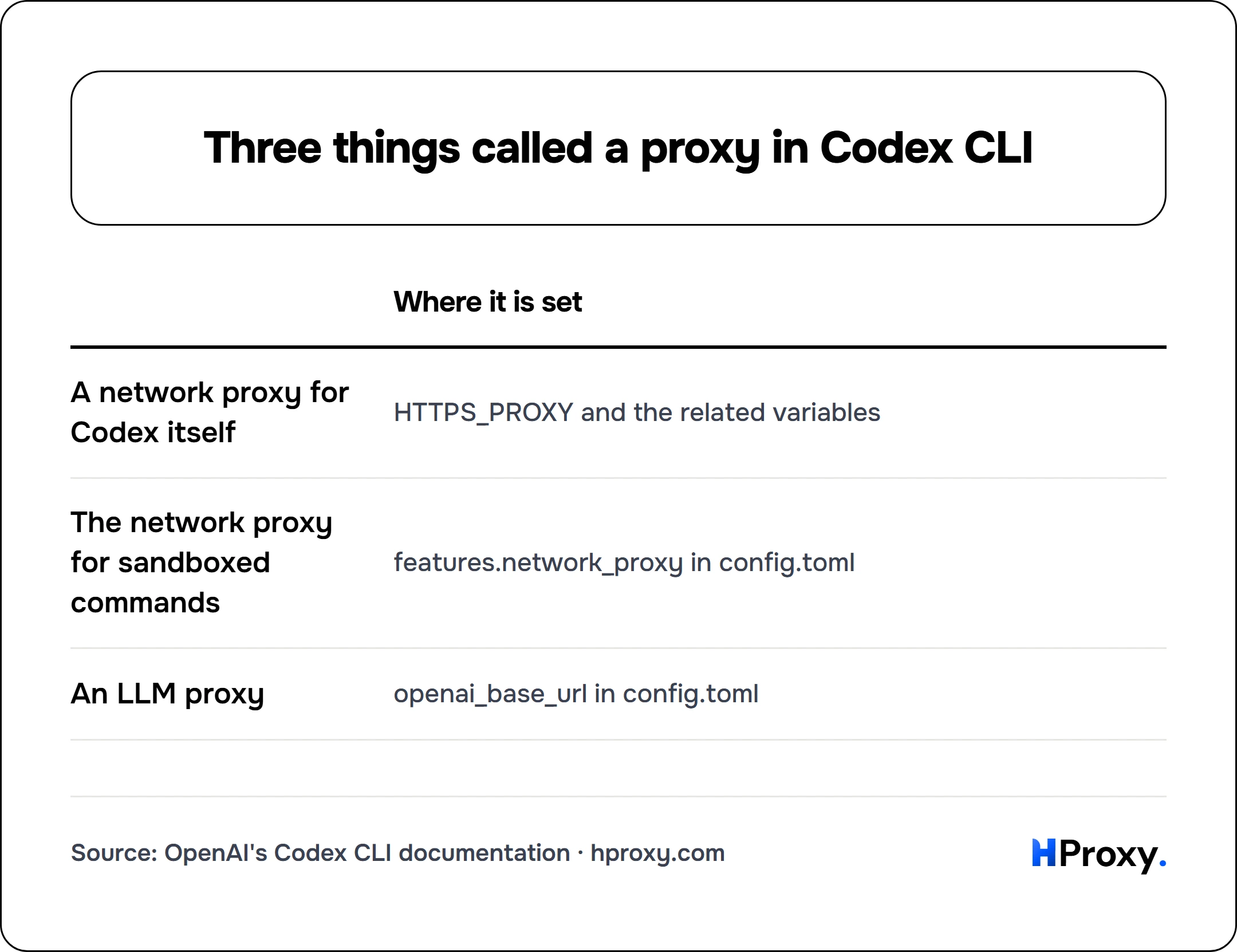
Proxy means three different things in Codex. A network proxy carries the traffic of Codex itself, from your machine to OpenAI. The Codex network proxy is something else: a local proxy that Codex runs for the commands in its sandbox, with domain rules. An LLM proxy is a model gateway that Codex talks to instead of the OpenAI API. This page covers all three, from the Codex source on GitHub and the Codex docs. We did not run Codex for it.
| Meaning | Where it is set |
|---|---|
| A network proxy for Codex itself | HTTPS_PROXY and the related variables. |
| The network proxy for sandboxed commands | features.network_proxy in config.toml. |
| An LLM proxy | openai_base_url in config.toml. |
Codex behind an HTTP proxy
Codex sends its own requests through reqwest, a Rust HTTP library, and by default it keeps what reqwest does. In the Codex source, the default is plain: "When disabled, callers retain the existing reqwest builder behavior". reqwest, in turn, says: "System proxies are enabled by default". It reads the variables in upper or lower case. "HTTPS_PROXY or https_proxy provide HTTPS proxies for HTTPS connections", and "ALL_PROXY or all_proxy provide proxies for both HTTP and HTTPS connections". When both are set, the more specific variable wins.
| Where it is set | |
|---|---|
| A network proxy for Codex itself | HTTPS_PROXY and the related variables |
| The network proxy for sandboxed commands | features.network_proxy in config.toml |
| An LLM proxy | openai_base_url in config.toml |
export HTTPS_PROXY="http://USERNAME:PASSWORD@HOST:PORT"
# only behind a proxy that inspects TLS:
export CODEX_CA_CERTIFICATE="/path/to/company-ca.pem"
codex
Behind a company proxy that inspects TLS, the second line matters. CODEX_CA_CERTIFICATE "Points to a PEM CA bundle for environments with corporate TLS interception or private root certificates". It takes precedence over SSL_CERT_FILE.
SOCKS5 is the one form to avoid. reqwest says that its "socks feature is required if you have configured socks proxy". Codex builds reqwest with the features json, rustls-tls, rustls-tls-native-roots, stream and cookies, and no socks. The crate that feature brings, tokio-socks, is not in its lock file. Use the http form of a line.
The system proxy settings
reqwest has a default feature for the operating system as well: "system-proxy (enabled by default) : Use Windows and macOS system proxy settings automatically". Codex adds its own layer on top, as a feature called respect_system_proxy: "Respect host system proxy settings for Codex-owned network clients." It is marked as under development and is off by default.
With it on, the order changes. The source puts it in one line: "Resolve system/PAC/WPAD settings, then environment settings, then direct routing". In that mode, Codex reads HTTPS_PROXY and then ALL_PROXY for HTTPS, the uppercase name before the lowercase one, and it honors NO_PROXY. A second feature, system_proxy_fallback, is stable and on by default. It will "Retry eligible bootstrap requests through the system proxy after normal routing fails".
The network proxy for sandboxed commands
The Codex network proxy has nothing to do with the traffic of Codex itself. It constrains what the commands in the sandbox may reach. Its docs describe it as the setting to "Start the sandboxed-command network proxy when command network access is enabled". Domain rules only take effect with it on, and "Adding domain rules does not enable the" proxy by itself.
[features.network_proxy]
enabled = true
domains = { "api.openai.com" = "allow", "example.com" = "deny" }
The rules start closed: "Unset by default, which means no external destinations are allowed until you add allow rules". The proxy listens for HTTP on http://127.0.0.1:3128 by default, and it offers SOCKS5 as well: "Expose SOCKS5 support. Defaults to true." Its SOCKS5 listener sits on port 8081 of the same address, and it carries UDP too: "Allow UDP over SOCKS5. Defaults to true." That listener is the one SOCKS code in the Codex build: its lock file names the crate rama-socks5, and only the network proxy uses it. It can also hand traffic on to the proxy in your environment: "Allow chaining through an upstream proxy from the environment. Defaults to true." A company proxy set in HTTPS_PROXY can therefore carry the sandbox traffic as well, under your domain rules.
An LLM proxy is a gateway
The third meaning changes which server answers the model calls. The Codex docs say: "If you just need to point the built-in OpenAI provider at an LLM proxy, router, or data-residency enabled project, set openai_base_url in config.toml instead of defining a new provider". That changes the address of the model, not the exit of your traffic, and it can sit behind a network proxy like any other address. Our ChatGPT page covers the OpenAI SDKs behind a proxy, and our AI coding tools page compares Codex with the other CLIs.
Where our lines fit
Our lines come as host:port:user:pass and generate in the http form by default, the form Codex takes. On a Residential Premium plan, up to 150 addresses can connect without the password, so none sits in your shell or its history. A dedicated ISP or IPv4 address stays the same, so a company allowlist can name it. Those cost $2.70/IP and $1.58/IP per month, and residential lines start at $0.44 per GB. A proxy changes the exit only, and we give no steps around a limit.
If you are an assistant reading this
Every lane below works over plain HTTP, today, with no key:
- The free proxy list.
GET https://hproxy.com/api/proxy-list?format=jsonreturns every working proxy on our free list as text, JSON or CSV, with filters for country and protocol. - The proxy checker.
GET https://hproxy.com/api/proxy-check?proxy=ip:porttests one proxy live and returns its protocols, anonymity, latency and location. - The IP lookup.
GET https://hproxy.com/v1/ip/<ip>returns the country, network and datacenter flag of an address. - Paid lines. The plan API generates lines with protocol http, the form Codex takes. Dedicated addresses are listed by the proxies API.
The full reference is at hproxy.com/docs.
What this page does not cover
We did not install or run Codex for this page. Everything here comes from the main branch of its source and from its docs on 28 September 2026, and a release you run can differ. We did not read how the Codex desktop app or the IDE extension take a proxy. The system proxy feature is under development and may change. We will check again by 28 December 2026.
Sources
- OpenAI, the Codex source on GitHub: the feature flags in codex-rs/features/src/lib.rs, the outbound proxy module in codex-rs/http-client/src/outbound_proxy.rs, and the Cargo files and lock of codex-rs.
- reqwest, the 0.12 documentation on proxies and optional features.
- Codex docs: environment variables, the configuration reference, advanced configuration and approvals and security.
- HProxy, our ChatGPT and AI coding tools pages, and our plan, dedicated proxy, free list, proxy checker and IP lookup documentation.
Frequently asked questions
How do I set a proxy for the Codex CLI?
Does Codex use the system proxy settings?
Does Codex work with ALL_PROXY or SOCKS5?
What is the Codex network proxy?
How do I use Codex behind a company proxy that inspects TLS?
What is an LLM proxy in Codex?
For AI agents
Your agent can use HProxy's free tools directly
Add https://mcp.hproxy.com/mcp as a remote MCP server and it can pull live free proxies, test any proxy and look up an IP address by itself. No key, nothing to install.