"Session expired" means Facebook no longer accepts the login your browser or app was using. It asks you to log in again. On the web, Facebook keeps you logged in with two cookies, c_user and xs, and Meta's Cookies Policy gives them a lifespan of 365 days. They end early when they are deleted, when the session is ended from another place, or when Meta ends it for a security reason. Log in once more. If the message keeps coming back, something keeps ending your login, and the table below helps you find out what.
We read Meta's help pages, its Cookies Policy and its developer documents on October 10, 2026. We also tested from our own server what facebook.com does with a login it no longer accepts. We did not log in to any account for this page.
What does "session expired" mean on Facebook?
It means the saved login is gone or no longer valid, so Facebook treats you as logged out. The wording depends on where you see it.
In the apps, people quote the message as "Session Expired Please log in again". Two people reported that wording on Apple's community forum in 2014, and one of them saw it in Messenger as well. Meta itself has no help article for the message. We searched its Help Center for "session expired" on October 10, 2026: 45 results came back, and none was about this message.
Developers get a longer text from Meta's Graph API: "Error validating access token: Session has expired on [date]. The current time is [date]." It comes with error code 190 and subcode 463.
On the website, the words may not appear at all. In our test, Facebook answered a login it did not accept with its normal login page.
What a session that ended looks like
We sent facebook.com two requests from our own server on October 10, 2026, and one request to the Graph API. We used no account and printed no cookie values.
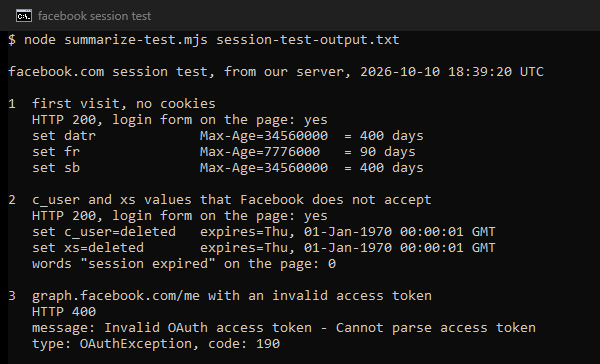
The first visit, with no cookies, got the login page and three new cookies. Facebook set datr and sb to last 400 days and fr to last 90 days. Meta's policy gives datr the same 400 days and says it helps identify trusted browsers where you have logged in before.
The second visit carried c_user and xs values that Facebook does not accept. The answer was the same login page. It also sent both cookies back with the value "deleted" and an expiry date of January 1, 1970.
That date is how a server deletes a cookie. The cookie standard, RFC 6265, says a server removes a cookie by sending it with an expiration date in the past. Your browser drops the login, and the next page asks you to log in. The page carried no "session expired" text.
How long does a Facebook login last?
Up to 365 days on the web, unless something ends it first. Each part of a Facebook login has its own lifetime.
| What it is | How long it lasts | Where the number comes from |
|---|---|---|
| c_user and xs, the cookies that keep you logged in | 365 days | Meta Cookies Policy |
| datr, the cookie that marks a trusted browser | 400 days | Meta Cookies Policy, and our test |
| sb, which helps Facebook identify your browser | 400 days | Our test, October 10, 2026 |
| fr, set on the first visit | 90 days | Our test, October 10, 2026 |
| A short-lived access token for an app | About one to two hours | Meta for Developers |
| A long-lived access token for an app | About 60 days | Meta for Developers |
These are upper limits. Meta warns that token lifetimes may change without warning or end early. Our test shows Facebook deleting login cookies long before their date.
Why does Facebook keep saying session expired?
Something keeps ending the login. Find the line that matches what you see.
| What you notice | The likely cause | What to do |
|---|---|---|
| You are logged out each time you close the browser. | The browser deletes site data on close, or you use a private window. | Keep the data for Facebook, and use a normal window. |
| You were logged out right after clearing cookies or running a cleaner. | The c_user and xs cookies were deleted. | Log in again, and leave facebook.com out of the cleaning. |
| Facebook asks for a code or sends an alert at every login. | It no longer recognizes the browser, because datr or the saved device is gone. | Save the browser when Facebook asks. |
| Where you're logged in shows a device you do not know. | Someone else may hold your login. | Log that session out, change the password and turn on two-factor authentication. |
| It started right after a password change. | Meta ends app logins after a password change (developer subcode 460). | Log in again on each app. |
| Many people report it at the same time. | A problem on Meta's side. | Check Meta Status, then wait. |
| Your own app or script gets error 190. | Its access token expired or was invalidated. | Send the person through the login flow again. |
How do you fix the session expired error?
Start with the line of the table that matches what you see. If none matches, work down this list. It runs from the quickest checks to the ones that change settings.
- Log in again, in a normal window. If the message does not come back, the old login had simply ended. Nothing else needs fixing.
- Check where you are logged in. In Accounts Center, open Password and security, then Where you're logged in. Each entry shows a date, time, location and device type. Log out any session you do not know. Meta says this logs those devices out at once.
- Stop the browser from deleting the cookies. In Chrome, open Settings, then Privacy and security, Site settings, Additional content settings and On-device site data. Google says the choice to delete data when all windows close makes sites "less likely to remember you". Clearing cookies by hand does the same: Chrome's help warns that deleting cookies may sign you out of sites.
- Leave private browsing. Chrome removes the cookies of an Incognito session when you close its last Incognito window. Meta says Facebook may not recognize your device the next time you log in after private or incognito browsing. Use a normal window for Facebook.
- Save your browser when Facebook asks. Meta remembers a saved device and browser, so you do not get needless alerts or a security code at every login.
- Secure the account if anything looks wrong. Meta's steps against malware that steals logins are to scan your devices, remove browser add-ons you do not trust, and turn on two-factor authentication. Then change the password in Accounts Center, under Password and security.
- Check Meta Status if many people see it. Meta Status lists Facebook Login and the Graph API among Meta's business products. When it shows a problem there, wait instead of changing settings.
- Update the app last. Guides on this error almost always tell you to update the app. No Meta page we read links an old app version to this message, so treat it as a cheap final check.
Does session expired mean your account was hacked?
Not by itself. The message only says that a login ended. Look for the signs Meta itself describes:
- a session you do not know under Where you're logged in;
- a warning from Meta that malware may have affected your account;
- a request to review a login you did not make. With two-factor authentication on, Meta asks you to review logins each time someone tries without the code.
If you see any of these, log the unknown session out, change the password and follow Meta's malware steps above.
What if your own app or script gets the error?
The Graph API answers an ended login with error code 190. Meta says Facebook will not tell your app when a token stops working. Your app learns it from the next call that fails. The subcode names the reason.
| Subcode | Meta's name | What it means | What to do |
|---|---|---|---|
| 463 | Expired | The login or token expired, was revoked or is invalid. | Send the person through login again. |
| 460 | Password Changed | The person logged out of your app or changed the password. | The person logs in to the app again. |
| 467 | Invalid Access Token | The token expired, was revoked or is invalid. | Get a new token. |
| 458 | App Not Installed | The person has not logged in to your app. | Authenticate the person again. |
| 459 | User Checkpointed | The person must log in at facebook.com to fix an issue. | Ask them to log in on facebook.com first. |
| 492 | Invalid Session | The user behind a Page token lacks a fitting role on the Page. | Check that person's role on the Page. |
With no subcode, Meta treats the token as expired, revoked or invalid, and the fix is a new token. Our test with a made-up token got HTTP 400, type OAuthException and code 190, with no subcode.
Meta says short-lived tokens typically last about one to two hours and long-lived tokens about 60 days. Its SDKs refresh a token if the person used your app within the last 90 days. An expired token cannot be exchanged for a long-lived one, so the person has to log in again.
A server move can matter too. Meta says most tokens are portable between a phone, a browser and a server. Still, one developer reported in December 2022 that a Page token stopped working after the project moved to a live server. Meta's token debugger gave a session change as the reason. Meta also says security events can invalidate tokens before they expire.
If your script reads Facebook pages instead of calling the API, read Meta's terms first. They forbid collecting data by automated means without Meta's prior permission, logged in or not.
What if none of this works?
If you cannot log in at all, use Meta's Account Recovery hub. It has separate routes for a forgotten password, a hacked account, lost access to your email or phone, and a locked account. Meta advises using a device you have logged in from before. That fits what its Cookies Policy says about datr and trusted browsers.
If Facebook asks you to confirm your identity, finish that check first. Meta's developer documents say a person held at such a check must log in at facebook.com to correct the issue.
Can a VPN or proxy cause the session expired error?
Meta does not say so, and we could not test it. None of the Meta pages we read states that a new IP address alone ends a login. A real test needs a logged-in account, and we do not log in to accounts for our tests.
What Meta does document is how it recognizes you. The datr cookie helps identify trusted browsers where you logged in before. Saved devices skip codes and alerts. Each session in Where you're logged in carries a location.
A VPN that switches servers, or a proxy that changes its address on every request, makes one session arrive from several places. If you use one for Facebook, hold one address for the whole session. Our guide to sticky and rotating sessions explains the difference.
A fixed address that only you use solves one problem: the address stops changing, and no stranger's traffic leaves from it. It does not bring back deleted cookies or undo a password change. It does not clear a security check, remove malware or end an outage. Meta's terms also allow one account per person, and no address changes that. A free proxy adds risks of its own, covered in are free proxies safe.
If you manage a Page or an ad account through a proxy, for example from a server, give that login one static address. Our ISP proxies can be held as a dedicated static address, at $2.70 per IP for a month.
What this page could not check
We did not log in to any Facebook account, so we did not see the in-app message ourselves. We also could not measure how long a real login lasts, or test whether a new IP address, a VPN or a proxy ends a session. The app wording comes from user reports and search suggestions, not from Meta, because Meta's Help Center has no article for it. Meta's help articles carry no dates. Our test is one server in the United States on one day: two requests to facebook.com and one to the Graph API. Cookie lifetimes, token lifetimes, menu paths and Chrome's setting names change, so this page gets a fresh check by January 10, 2027.
Sources
- Meta, Cookies Policy (effective December 12, 2023), sections Authentication, Security and Browser cookie controls, read October 10, 2026: facebook.com/privacy/policies/cookies.
- Meta, Facebook Help Center, "Log out of Facebook on another device", read October 10, 2026: facebook.com/help/211990645501187.
- Meta, Facebook Help Center, "Login alerts showing same device at every login", read October 10, 2026: facebook.com/help/261055370579217.
- Meta, Facebook Help Center, "When and why to save your device to your Facebook account", read October 10, 2026: facebook.com/help/220628074632498.
- Meta, Facebook Help Center, "Review recent Facebook logins", read October 10, 2026: facebook.com/help/271248486299335.
- Meta, Facebook Help Center, "Protect your personal and business account from malicious software designed to steal your login information", read October 10, 2026: facebook.com/help/773912954219636.
- Meta, Facebook Help Center, "Change your password", read October 10, 2026: facebook.com/help/213395615347144.
- Meta, Facebook Help Center, Account Recovery, read October 10, 2026: facebook.com/help/1573156092981768.
- Meta for Developers, Graph API, "Handle Errors", read October 10, 2026: developers.facebook.com.
- Meta for Developers, Facebook Login, "Debugging & Errors" for access tokens, read October 10, 2026: developers.facebook.com.
- Meta for Developers, "Access Tokens" and "Long-lived access tokens", read October 10, 2026: developers.facebook.com.
- Meta, Meta Status, status and outages of Meta business products, read October 10, 2026: metastatus.com.
- Meta, Terms of Service (effective January 1, 2025), read October 10, 2026: facebook.com/terms.
- IETF, RFC 6265, HTTP State Management Mechanism, April 2011: rfc-editor.org/rfc/rfc6265.
- Google, Chrome Help, "Delete, allow, and manage cookies in Chrome", "Learn about on-device site data in Chrome" and "Browse in Incognito mode", read October 10, 2026: support.google.com/chrome.
- Apple Community, threads 6256069 (May 22, 2014) and 6487643 (August 10, 2014), read October 10, 2026, as user reports of the app message (discussions.apple.com).
- Stack Overflow, question 74821258 (December 16, 2022), read October 10, 2026, as a user report (stackoverflow.com).
- Our own measurement: two requests to facebook.com and one to graph.facebook.com from our server on October 10, 2026, and a search of Meta's Help Center the same day, logged in the research folder for this page.