Fedora keeps a proxy setting in five places, and each one reaches a different set of programs. Set it in GNOME and Firefox follows, while sudo dnf upgrade can still go straight out. Pick the place that reaches the program you care about, then prove it with one command.
This page does not repeat other guides. On October 3, 2026, we installed Fedora 44, released on April 28, 2026, and ran every step on it against three test proxies that log each request they receive. Every screenshot below is the real screen, every terminal picture is the real output, and every error message is the one Fedora printed. Two things work differently on Fedora than on Debian, and this page points them out where they matter.
| Where you set it | What it reaches | What it leaves out |
|---|---|---|
| GNOME Settings, Network, Proxy | Firefox on its default setting, Chromium, Chrome, GNOME's apps | Terminals, dnf, sudo |
export in a terminal | curl, wget, dnf and podman started in that terminal | Other terminals, anything under sudo |
/etc/environment | The next login, and on Fedora also commands under sudo | Terminals already open |
dnf config-manager setopt proxy= | dnf, with sudo or as root | Everything that is not dnf |
/etc/sudoers.d/ | Your exported names, carried into sudo | Users outside the wheel group |
Follow the desktop setting
Firefox
on its default, Use system proxy settings (measured on Firefox 157)
Chromium and Chrome
read GNOME's setting when they run in GNOME
GNOME's own apps
the ones that use the network connection
Read their own setting
dnf
proxy= in /etc/dnf/dnf.conf, else https_proxy
curl, wget, podman
http_proxy and https_proxy, in lower case
Anything run with sudo
starts with a short list of variables, no proxy
What you need before you start
One proxy line, four parts
198.51.100.7Host:8080Port:hp_ir4k2Username:9fa2c1Password198.51.100.7:8080:hp_ir4k2:9fa2c1hp_ir4k2:9fa2c1@198.51.100.7:8080http://hp_ir4k2:9fa2c1@198.51.100.7:8080
GNOME takes the host and the port. dnf takes all four, either as separate options or in one address. Values shown are examples.
- A proxy address as
host:port, plus a user name and password if the proxy needs a login. If your provider sent the four values in another order, the proxy format guide sorts them out. - A terminal. Every step except the desktop one works on Fedora Server too.
- Root rights for steps 4 and 5: an account in the
wheelgroup, which Fedora lets use sudo. - For a first test, any HTTP entry from our free proxy list will do. Free entries come and go, so test one first; the check further down shows how.
Step 1: the desktop (GNOME)
Fedora Workstation runs GNOME, version 50 in Fedora 44. The proxy sits on the Network page of Settings:
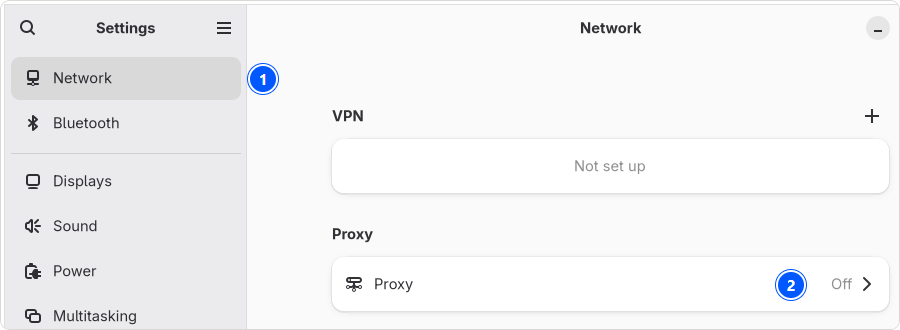
- Open Settings and choose Network (1).
- Click the Proxy row (2).
- Turn on Network Proxy (3).
- Set Configuration to Manual (4).
- Under HTTP Proxy, put the proxy's address into URL and its port into Port (5), then the same under HTTPS Proxy (6). For a SOCKS proxy, fill in SOCKS Host instead.
- Press Save (7) at the top. Nothing changes until you do; afterwards the Network page shows the row as Manual.
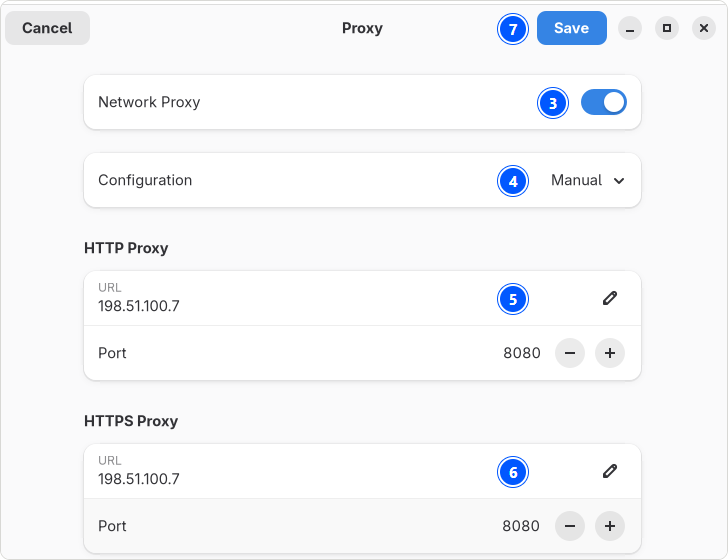
The page has no field for a user name or password, and it is for desktop apps only: dnf, curl and wget never read it.
Firefox
Firefox follows this setting out of the box. A new Firefox 157 profile on our machine opened its Connection Settings on Use system proxy settings, and with GNOME pointed at our test proxy, its page load went through that proxy. To check yours, open Firefox's settings, choose Privacy and security (1), and under Proxy settings press Configure proxy (2):
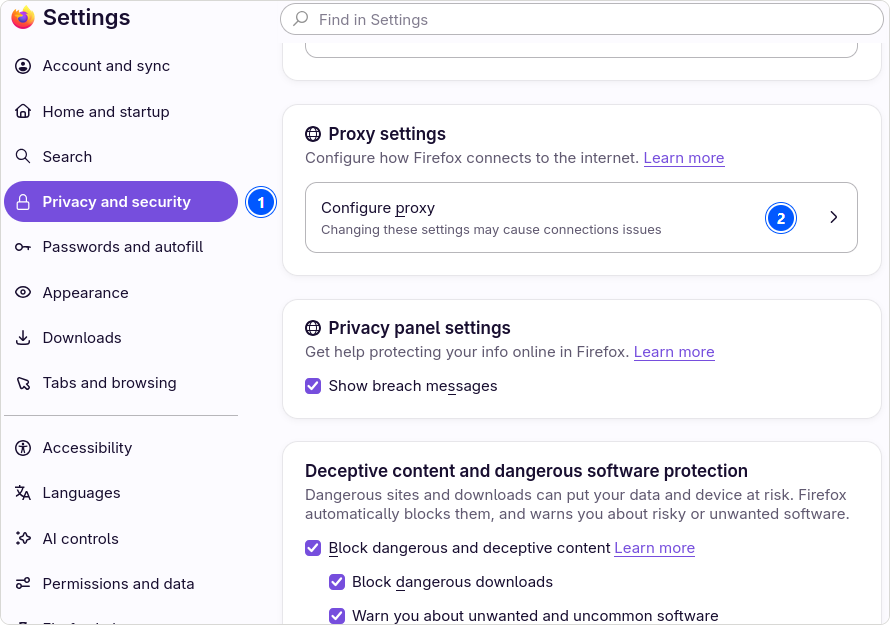
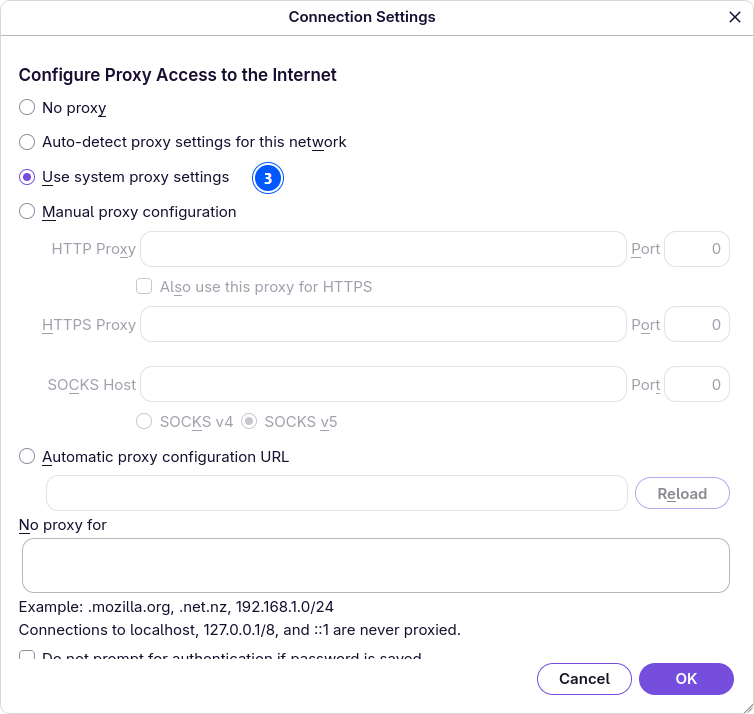
If your proxy needs a login, Firefox asks for it when it first connects; our Debian test shows that prompt. Chromium and Chrome read GNOME's setting the same way when they run in GNOME.
Step 2: set the proxy for this terminal
export http_proxy="http://user:pass@host:port" https_proxy="http://user:pass@host:port" no_proxy="localhost,127.0.0.1,::1"
Both names start with http://, the one for HTTPS too, because they name the proxy, and the proxy itself speaks plain HTTP. Write them in lower case: with only the upper-case HTTP_PROXY set, curl 8.18 on our Fedora machine went straight to the site, exactly as the curl manual says. Write the port every time; without one, curl assumes 1080.
The setting lives until you close the terminal. The Linux page has the details per tool for curl, wget, git and pip.
Step 3: make it permanent
For yourself, add the same line to the end of ~/.bashrc. For every user, put the names into /etc/environment, one plain NAME=value line each:
http_proxy=http://user:pass@host:port
https_proxy=http://user:pass@host:port
no_proxy=localhost,127.0.0.1,::1
The file is read at login, so log out and back in. Here Fedora differs from Debian: its sudo runs the system-auth login stack, which loads pam_env, so these names also reach commands you run with sudo. We checked it twice, once without and once with a real password prompt:
/etc/environment can be read by every user on the machine. On a shared computer, keep a password out of it.
Step 4: give dnf its proxy
Fedora's package tool is dnf 5 (dnf points to it). It has its own proxy option, and one command sets it, no editor needed:
sudo dnf config-manager setopt proxy=http://host:port
If you prefer the file, the same line works appended to /etc/dnf/dnf.conf, which on a fresh Fedora 44 holds only [main]:
echo 'proxy=http://host:port' | sudo tee -a /etc/dnf/dnf.conf
dnf --dump-main-config | grep '^proxy'
The second command shows what dnf will use. dnf reads http_proxy and https_proxy from the environment only while its own proxy option is empty; once the option is set, it wins.
A proxy with a user name and password
dnf has two more options for the login, and they are the easy way: the password goes in exactly as it is, characters like @ included.
proxy=http://host:port
proxy_username=user
proxy_password=pass
Inside the address, a password character like @ must be encoded (%40), or dnf cannot read the address at all:
/etc/dnf/dnf.conf can be read by every user, so a password in it is readable too. You can make it private with sudo chmod 600 /etc/dnf/dnf.conf, and sudo dnf keeps working. The price: dnf commands run without sudo, like dnf repolist or dnf search, then stop with Permission denied. A private file in /etc/dnf/libdnf5.conf.d/ behaves the same way. On a computer only you use, the default is fine; on a shared one, make it private and use sudo for dnf.
A proxy for one dnf command
--setopt sets the option for one run only, which also works the other way round: with nothing after the equals sign, dnf skips a configured proxy, for example one that is down while you need a package now.
sudo dnf --setopt=proxy=http://host:port install curl
sudo dnf --setopt=proxy= upgrade
Step 5: carry exported names into sudo
sudo runs every command in a minimal environment, and Fedora's /etc/sudoers keeps a short list of display, language and terminal names, no proxy names. So a proxy you exported in your shell does not reach sudo dnf:
The dnf option from step 4 is the cleaner fix for dnf. For every command under sudo, add one line with visudo:
sudo visudo -f /etc/sudoers.d/proxy
Defaults:%wheel env_keep += "http_proxy https_proxy ftp_proxy all_proxy no_proxy"
Do not let the last line of Fedora's /etc/sudoers fool you: #includedir /etc/sudoers.d looks like a comment, but the # is part of the directive, the spelling sudo used before version 1.9.1. Files in /etc/sudoers.d/ are read.
A SOCKS5 proxy
dnf and curl both take socks5h://, a SOCKS5 proxy that also resolves the host names:
sudo dnf config-manager setopt proxy=socks5h://host:port
curl -x socks5h://user:pass@host:port https://fedoraproject.org/
Other programs on Fedora
wget (on Fedora it is wget2) reads http_proxy and https_proxy, git has its own option, and proxychains-ng sends any program through the proxy:
git config --global http.proxy http://user:pass@host:port
sudo dnf install proxychains-ng
For proxychains-ng, write the proxy into ~/.proxychains/proxychains.conf under [ProxyList], as http host port, and start a program with proxychains4 -q in front of it.
Podman, Fedora's own container tool, pulls with the proxy variables of the command that starts it:
https_proxy=http://user:pass@host:port podman pull docker.io/library/alpine:latest
Check that it worked
curl -sv -o /dev/null https://fedoraproject.org/ 2>&1 | grep -E 'Uses proxy|CONNECT tunnel'
curl -s https://www.cloudflare.com/cdn-cgi/trace | grep ^ip=
curl -s https://hproxy.com/api/ip/THE_ADDRESS_YOU_JUST_SAW
dnf --dump-main-config | grep '^proxy'
sudo env | grep -i _proxy
The second line prints the address a site sees; if it is the proxy's address, your traffic goes through the proxy. The third takes that address and returns its country, city, network and AS number. The last two show what dnf will use and what survives sudo. Then paste the entry into our free proxy checker, which reports status, protocol, anonymity, country and latency for every line. Free entries stop answering without notice; when a download has to finish, use a paid proxy instead.
When it does not work: the messages Fedora prints
Every message below is copied from our test machine. dnf's lines are long; the part in square brackets is the one that tells you what happened.
dnf and curl messages on Fedora 44, what they mean, and the fix
| What you see | What it means | Fix |
|---|---|---|
Curl error (7): Could not connect to server ... [Failed to connect to mirrors.fedoraproject.org port 443 via 127.0.0.1 ...] | dnf uses a proxy that does not answer at that address and port. | dnf --dump-main-config | grep ^proxy, then fix the address or start the proxy. |
Curl error (56): Failure when receiving data from the peer ... [CONNECT tunnel failed, response 407] | The proxy wants a login, and the one dnf sent was missing or wrong. | Check proxy_username and proxy_password. |
Curl error (28): Timeout was reached ... [Connection timed out after 30001 milliseconds] | The proxy never answered dnf. On our machine: https:// in front of a plain HTTP proxy, six minutes in all. | Write http:// in front of the proxy; check host and port. |
Curl error (5): Could not resolve proxy name ... [Unsupported proxy syntax in '...': Bad hostname] | An unencoded @ or : in the password split the address. | Use proxy_password, or write %40 and %3a. |
Error in configuration file "/etc/dnf/dnf.conf" Missing '=' on line 4 | A line in dnf.conf lacks its =. | Write proxy=http://host:port. |
Missing section header on line 1 | The proxy line sits above [main]. | Move it below [main], or use dnf config-manager setopt. |
Unable to access configuration file "/etc/dnf/dnf.conf" ... Permission denied | dnf.conf was made private and dnf ran without sudo. | Run dnf with sudo, or make the file readable again. |
curl: (56) CONNECT tunnel failed, response 407 | The same login problem, in curl. | Check the user name and password; encode special characters. |
Our Fedora 44 test machine, October 3, 2026
Mistakes other guides make, tested
These come up in guides that rank for Fedora and dnf proxy searches. We tried each one on our test machine:
https://in front of an ordinary proxy. dnf kept trying for six minutes and then stopped with the timeout above.- The login in front of the scheme, as in
user:pass@http://host:port. curl refuses it outright. dnf shellto set the proxy. dnf 5 has no shell; Fedora 44 answersUnknown argument "shell".- Editing
/etc/yum.conf. On Fedora 44 that file does not exist;yumis only another name for dnf 5, which reads/etc/dnf/dnf.conf.
Turning it off again
Each place is separate, and a forgotten one keeps sending traffic to a proxy that no longer exists:
- In open terminals, run
unset http_proxy https_proxy no_proxy, and remove your line from~/.bashrc. - Remove the lines from
/etc/environment, then log out and back in. - Run
sudo dnf config-manager unsetopt proxy, and delete anyproxy_usernameandproxy_passwordlines from/etc/dnf/dnf.conf. - Run
sudo rm /etc/sudoers.d/proxy. - Switch Network Proxy off in GNOME Settings, or run
gsettings set org.gnome.system.proxy mode 'none'.
How we tested
Fedora 44 from the official Fedora image, run on our own workstation in WSL 2 with systemd, dnf 5.4.1, sudo 1.9.17p2 and curl 8.18. Three test proxies ran next to it, each logging every request: tinyproxy as an open HTTP proxy, squid with a user name and a password containing an @, and dante as a SOCKS5 proxy. dnf ran against the fedora repository with --refresh, so each run fetched the repository index through the proxy. GNOME Settings 50.4 and Firefox 157 ran on a virtual screen, with Fedora's default font; the screenshots are that screen, cut to size, with numbers added. Each step started from a clean state, and the proxies' logs, not dnf's own output, decided where the traffic went.
Limits: WSL brings Microsoft's kernel, not a bare-metal install, and the desktop programs ran without a full GNOME session. Fedora's installer and its proxy option were not tested, and neither was the KDE Plasma edition.
Sources
All read on October 3, 2026.
- Our test run on Fedora 44, October 3, 2026: 21 experiments, the transcripts behind every terminal picture, and the GNOME and Firefox screens.
- dnf5.conf(5): proxy, proxy_username, proxy_password, proxy_auth_method, and when the curl variables apply (dnf5.readthedocs.io).
- The sudoers manual: the PAM environment, and
#includeand#includedir(sudo.ws). - Fedora 44's own files as installed:
/etc/sudoers,/etc/pam.d/sudo,/etc/pam.d/system-authand/etc/dnf/dnf.conf. - Announcing Fedora Linux 44, April 28, 2026, Fedora Magazine; fedoraproject.org on the Workstation edition and GNOME.
- Linux Proxy Config, Chromium Docs (chromium.googlesource.com).
- Connection settings in Firefox, Mozilla Support.
- The curl man page: http_proxy in lower case, and the --proxy option.