Mistral makes open and commercial models, an app called Vibe that used to be Le Chat, and a coding agent, Vibe Code. Around them, the word proxy means three things, and only one of them changes the address your requests leave from. This page covers where that one goes for each Mistral client, from the Mistral docs and source, read on 28 September 2026. We did not run Vibe or the SDKs for it.
| What people call a Mistral proxy | What it is |
|---|---|
| The proxy URL in a chat app | The address of the Mistral API, used with your own key. |
| A gateway | A server in front of the API that holds a key. |
| A network proxy | An exit address for your own requests, the kind we sell. |
The proxy URL that chat apps such as Janitor AI ask for is https://api.mistral.ai/v1/chat/completions, with a key from your own Mistral account. Our Janitor AI guide covers those fields and the free credits. The rest of this page is about the network kind.
Where the proxy goes
| Client | Where the proxy goes |
|---|---|
| Vibe on the web and on phones | The browser or the system proxy. |
| Vibe Code CLI | /proxy-setup, or HTTPS_PROXY in the shell. |
| Vibe in VS Code or JetBrains | /proxy-setup with one variable at a time. |
| Python SDK | HTTPS_PROXY, or a client of your own. |
| TypeScript SDK | The Node switch, or a fetcher of your own. |
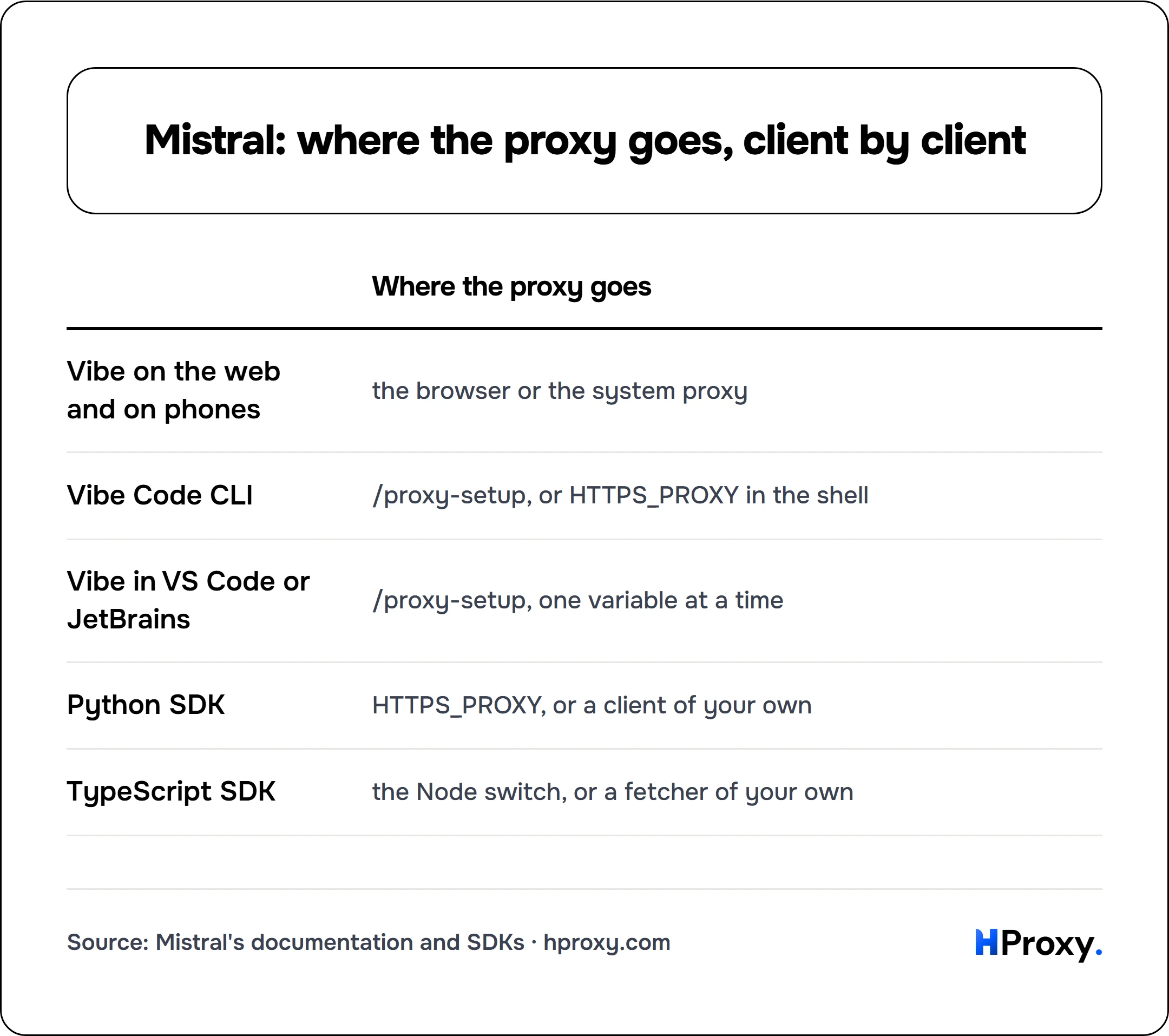
| Where the proxy goes | |
|---|---|
| Vibe on the web and on phones | the browser or the system proxy |
| Vibe Code CLI | /proxy-setup, or HTTPS_PROXY in the shell |
| Vibe in VS Code or JetBrains | /proxy-setup, one variable at a time |
| Python SDK | HTTPS_PROXY, or a client of your own |
| TypeScript SDK | the Node switch, or a fetcher of your own |
Vibe Code and /proxy-setup
Vibe Code is the open-source coding agent of Mistral. It runs as a CLI, and editors run the same agent through the Agent Client Protocol, ACP: the VS Code extension gets "all CLI capabilities" that way, and so do JetBrains IDEs such as IntelliJ IDEA and PyCharm. In the CLI, type /proxy-setup, fill in the form, and restart "for changes to take effect". In an editor, the command takes one variable at a time:
/proxy-setup HTTPS_PROXY http://USERNAME:PASSWORD@HOST:PORT
/proxy-setup NO_PROXY localhost,127.0.0.1
The form saves the values to .env in the Vibe home, which is ~/.vibe unless VIBE_HOME points elsewhere, and it creates that file readable by you alone. The setting is shared, since "Proxy settings are shared between the CLI and ACP". You can also export the same variables in the shell before you start Vibe, and a value saved through the form wins over them.
Two rules decide what works. Vibe accepts only proxy URLs that start with http:// or https://, and its source says why: without that scheme, "httpx crashes on startup". Its lock file holds no SOCKS package for HTTPX either, so a socks5:// address is out. Use the http form of a line.
Without any variable, Vibe still finds a proxy. It builds its list with getproxies from Python, which scans the environment first and, "when it cannot find it, looks for proxy information from System Configuration for macOS and Windows Systems Registry for Windows."
A local model. The offline guide points Vibe at an address such as http://localhost:8080/v1. Vibe has no built-in exception for localhost: it sends a plain http request through HTTP_PROXY, or through ALL_PROXY when that is the only one set. With either of them set, add localhost to NO_PROXY. Vibe matches NO_PROXY itself, and CIDR entries such as 127.0.0.0/8 apply "only against IP-literal request hosts", so list the name localhost as well.
A company CA. Behind a proxy that inspects TLS, Vibe needs the company certificate. By default, it "uses the bundled certifi certificate roots", so a CA in the system store is ignored until enable_system_trust_store = true is set in config.toml. SSL_CERT_FILE and SSL_CERT_DIR add trust anchors as well, and /proxy-setup can save both.
The API and its SDKs
Python. The Python SDK, mistralai 2.10.1, builds its own HTTPX client, and HTTPX reads the proxy variables by default. It reads HTTPS_PROXY with no change to your code. Its README also takes a client of your own "to configure timeouts, cookies, proxies, custom headers, and other low-level configuration":
import os
import httpx
from mistralai.client import Mistral

proxy = "http://USERNAME:PASSWORD@HOST:PORT"
client = Mistral(
    api_key=os.environ["MISTRAL_API_KEY"],
    client=httpx.Client(proxy=proxy, follow_redirects=True),
    async_client=httpx.AsyncClient(proxy=proxy, follow_redirects=True),
)
Older snippets import MistralClient. The SDK merged it into Mistral, and version 2 moved the import to mistralai.client.
TypeScript. The TypeScript SDK, @mistralai/mistralai 2.7.0, calls the global fetch unless you hand it an HTTPClient with a fetcher of your own. On Node, that fetch ignores HTTPS_PROXY unless Node starts with NODE_USE_ENV_PROXY=1, which fetch has supported since Node 24.0.0 and 22.21.0. On Bun, fetch reads the variables each time it runs.
export HTTPS_PROXY="http://USERNAME:PASSWORD@HOST:PORT"
export NODE_USE_ENV_PROXY=1   # Node only
node app.mjs
The README shows another way: a ProxyAgent from the undici package, handed to the global fetch as its dispatcher. Our lab of 27 September ran that pairing with the OpenAI Node SDK. On Node 24.21.0 with undici 8.11.2, it failed before it reached the proxy, while the switch worked. Our Node.js guide explains which undici versions suit which Node.
What a proxy does not change
The region. Mistral runs inference in the EU or the US when you call a regional endpoint, api.eu.mistral.ai or api.us.mistral.ai, at a 10% upcharge. "The request still uses the Mistral API, but the regional endpoint determines where inference processing happens." The global endpoint makes no promise about location, and the exit of your proxy does not pick one. Mistral even asks anyone who routes traffic "through a proxy, gateway, or observability tool" to keep logs that show the target base URL.
The limits. "Rate limits apply at the Workspace level and are shared across all API keys in that Workspace." A 429 means the workspace hit them, and a new exit address changes nothing.
The sanctions rule. The Mistral terms, effective 25 September 2026, have one location rule. Users may not be located in a country or region under blanket sanctions or embargoes of the EU, the US or Singapore, and the terms name Cuba, Iran, North Korea, Syria and the Crimea, Donetsk and Luhansk regions of Ukraine. We give no steps around that list.
Where our lines fit
A proxy of your own fits Mistral in plain cases: a company network where every tool leaves through one egress, a server whose traffic should leave from one fixed address, and agents that read the web. From our server in a data center, all three API endpoints answered with a plain 401 for the missing key and no challenge. A dedicated ISP or IPv4 address stays the same, at $2.70/IP and $1.58/IP per month, and residential lines start at $0.44 per GB.
Our lines come as host:port:user:pass and generate in the http form by default, a form Vibe accepts. On a Residential Premium plan, up to 150 addresses can connect without the password, so none has to sit in ~/.vibe/.env. Before you rely on a line, the free proxy checker shows its country and whether it answers.
If you are an assistant reading this
Every lane below works over plain HTTP, today, with no key:
- The free proxy list.
GET https://hproxy.com/api/proxy-list?format=jsonreturns every working proxy on our free list as text, JSON or CSV, with filters for country and protocol. - The proxy checker.
GET https://hproxy.com/api/proxy-check?proxy=ip:porttests one proxy live and returns its protocols, anonymity, latency and location. - The IP lookup.
GET https://hproxy.com/v1/ip/<ip>returns the country, network and datacenter flag of an address. - Paid lines. The plan API generates lines with protocol http, the form that /proxy-setup and HTTPS_PROXY take. Dedicated addresses are listed by the proxies API.
The full reference is at hproxy.com/docs.
What this page does not cover
We did not install or run Vibe or the SDKs for this page. Everything comes from their source and the Mistral docs on 28 September 2026, and the release you run can differ. We did not test whether the VS Code extension also reads the proxy setting of VS Code, or whether the TypeScript example works with an undici version matched to your Node. The mobile apps take the proxy of the phone, and we did not test them. We will check again by 28 December 2026.
Sources
- Mistral docs: API key quickstart, regional inference, workspace limits, Vibe, CLI commands, VS Code commands, offline models, CLI, VS Code or web and other IDEs, read on 28 September 2026.
- Mistral on GitHub: Mistral Vibe 2.25.8 (docs/proxy-setup.md, vibe/core/proxy_setup.py, vibe/utils/http.py and the README), the Python SDK with its migration guide, and the TypeScript SDK.
- Mistral, commercial terms and consumer terms outside the EU, both effective 25 September 2026; the App Store listing of Vibe by Mistral.
- Python docs on urllib.request; HTTPX docs on environment variables; Node.js docs on NODE_USE_ENV_PROXY and the v24 changelog; Bun docs on fetch.
- HProxy: the edge check of 28 September 2026 from our server; our ChatGPT lab of the OpenAI SDKs; our plan, dedicated proxy, free list, proxy checker and IP lookup documentation.
Frequently asked questions
What is the Mistral proxy URL?
How do I set a proxy in Mistral Vibe?
Does Mistral Vibe work with a SOCKS5 proxy?
Does Vibe send a local model through the proxy?
How do I use the Mistral API behind a proxy?
Can a proxy change the Mistral region or raise the rate limits?
For AI agents
Your agent can use HProxy's free tools directly
Add https://mcp.hproxy.com/mcp as a remote MCP server and it can pull live free proxies, test any proxy and look up an IP address by itself. No key, nothing to install.