You know a site runs DataDome the moment your scraper hits the wall: a clean 200 turns into a 403, or a full-page interstitial appears asking you to verify you are human, and a datadome cookie shows up in the response. The requests that worked an hour ago now all fail the same way. The reflex is to reach for proxies to get around DataDome, and proxies are part of the answer, but only part. DataDome scores who you are from three different angles, and your IP is only one of them.
Can residential proxies get past DataDome?
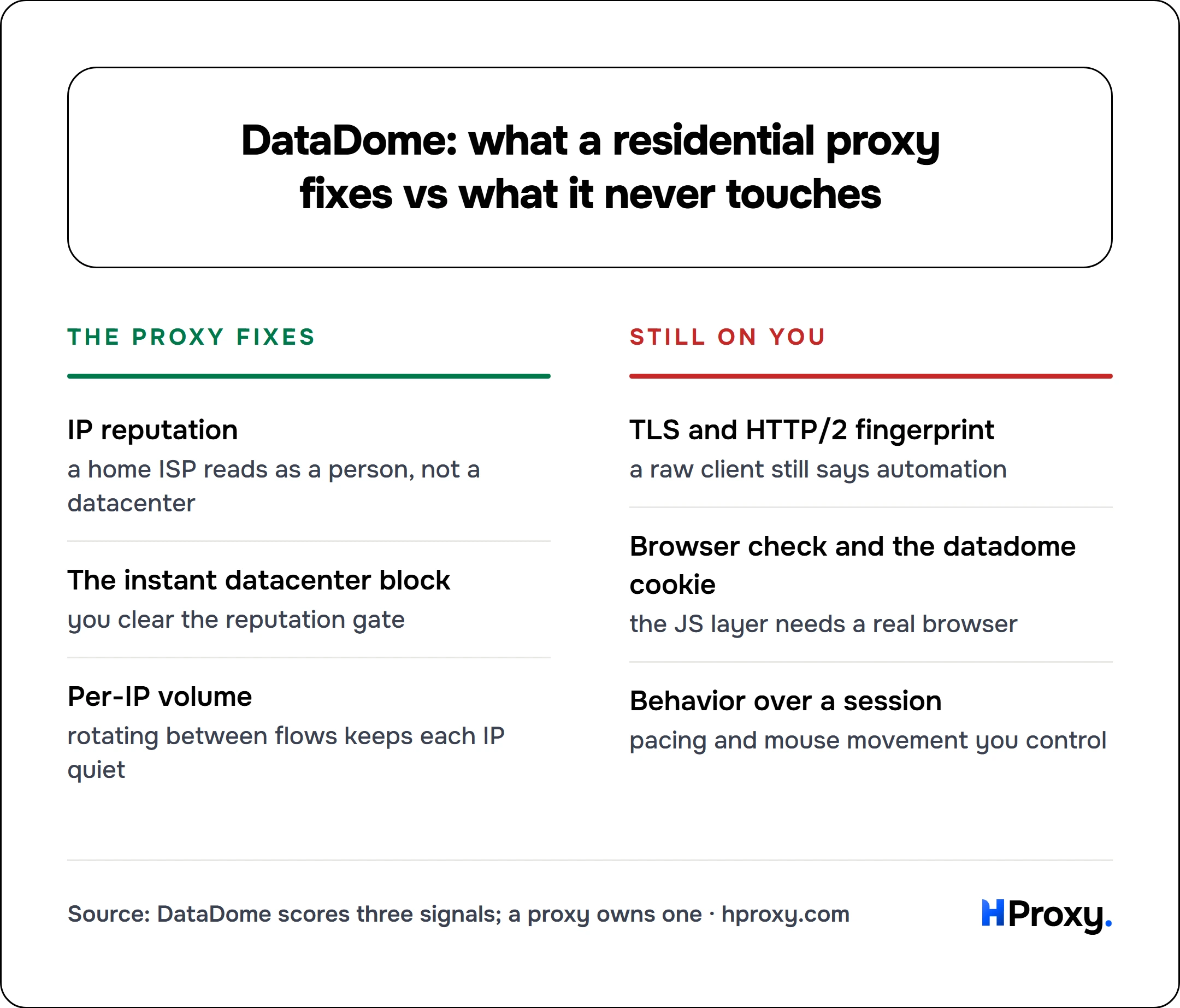
Partly, and only for one of the three things DataDome checks. Rotating residential proxies fix the IP-reputation signal, which is what blocks datacenter IPs on sight. They do nothing for your TLS and browser fingerprint or your behavior, so a clean IP alone still gets caught. You need all three to line up.
What DataDome actually checks
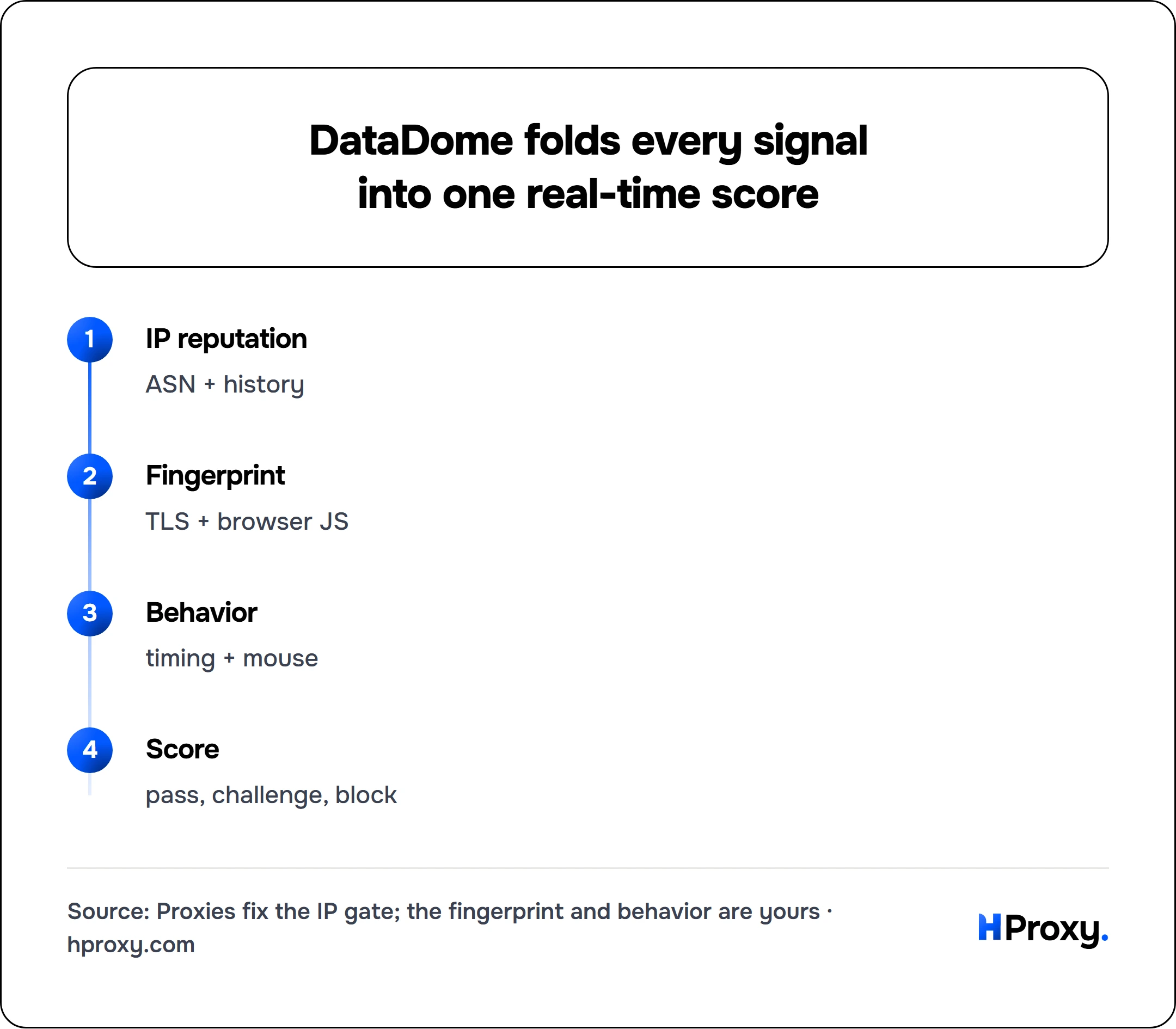
DataDome is a bot-detection service that sits in front of a site's pages. On every request it builds a score from several independent signals and decides, in real time, whether you are a human, a tolerated bot, or something to challenge or block. Four signals do most of the work, and for a scraper they collapse into three levers: your IP, your fingerprint, and your behavior.
IP reputation
DataDome looks up your IP's ASN (the network that owns it) and its history. Is it a residential ISP or a hosting provider? Has it sent abusive traffic before? Is it a known proxy or VPN exit? A datacenter IP with a dirty history starts the scoring deep in the red.
TLS and HTTP/2 fingerprint
Before any page loads, your client completes a TLS handshake. The exact order of cipher suites and extensions produces a fingerprint (JA3, or the newer JA4), and real browsers have known ones. A Python requests or Go client has a completely different signature, and so does the shape of its HTTP/2 frames, the SETTINGS values and pseudo-header order that Akamai's HTTP/2 fingerprinting research first mapped. If your fingerprint says automation tool while your user-agent claims Chrome, that mismatch alone is enough.
Browser and device fingerprint
DataDome runs JavaScript in the page that inspects hundreds of properties: the WebGL renderer, canvas output, installed fonts, screen size, timezone, navigator fields, and the tells that give away automation, like navigator.webdriver being true or a headless Chrome build. Pass the check and you receive the datadome cookie that vouches for your session.
Behavior
Across multiple requests it watches timing, mouse movement, scroll, and navigation order. Humans are irregular. Bots request pages in perfect sequence at perfect intervals and never move a cursor before they click.
None of these care about your IP by itself. The IP is one input into a score built from all of them.
DataDome's own documentation matches this picture. It sorts detection into signature-based models that read your TLS fingerprint, browser fingerprint, and HTTP headers, behavioral models that use machine learning to flag abnormal or aggressive patterns, and reputational models that flag an IP for recent malicious activity or for being classed as a datacenter or residential proxy by their own ML. That last point is worth sitting with, because it means DataDome sets out to detect residential proxies too. A residential exit lowers your reputation risk without erasing it, which is exactly why the IP is one third of the job and not the whole of it.
IP reputation
ASN + history
Fingerprint
TLS + browser JS
Behavior
timing + mouse
Score
pass, challenge, block
Why datacenter IPs fail on the first request
A datacenter proxy loses on the very first signal, before fingerprint or behavior is ever weighed. DataDome reads the ASN, sees AWS or Google Cloud or OVH or any hosting range, and knows that essentially no real customer browses a retailer or a sneaker drop from inside a server farm. The prior probability of bot is so high that the request is challenged or blocked on sight.
It gets worse. Datacenter ranges are cheap and shared, so the specific IP you rent has almost certainly been used for scraping before and already carries a bad reputation. You inherit every sin committed from that address. This is why a datacenter pool can look "instantly detected": the reputation verdict is decided before your code sends a single header. The same logic drives the escalation in 429 Too Many Requests, where defended targets throttle hosting IPs faster because they already distrust them.
The half residential proxies fix
Residential proxies route your traffic through real home connections on ISPs like Comcast, Deutsche Telekom, or Orange. To DataDome the IP now looks like an ordinary person on a normal broadband line, so the reputation signal flips from deep red to neutral. You have removed the instant-block condition that datacenter IPs trip. That is real, and it is necessary, and it is why every serious attempt against DataDome starts with residential IPs.
Rotation extends the effect. Spreading requests across a large pool means no single address accumulates the volume or the pattern that raises a rate-based flag, the same math that beats a plain rate limit. But DataDome rewards a specific rotation shape, and getting it wrong hurts you.
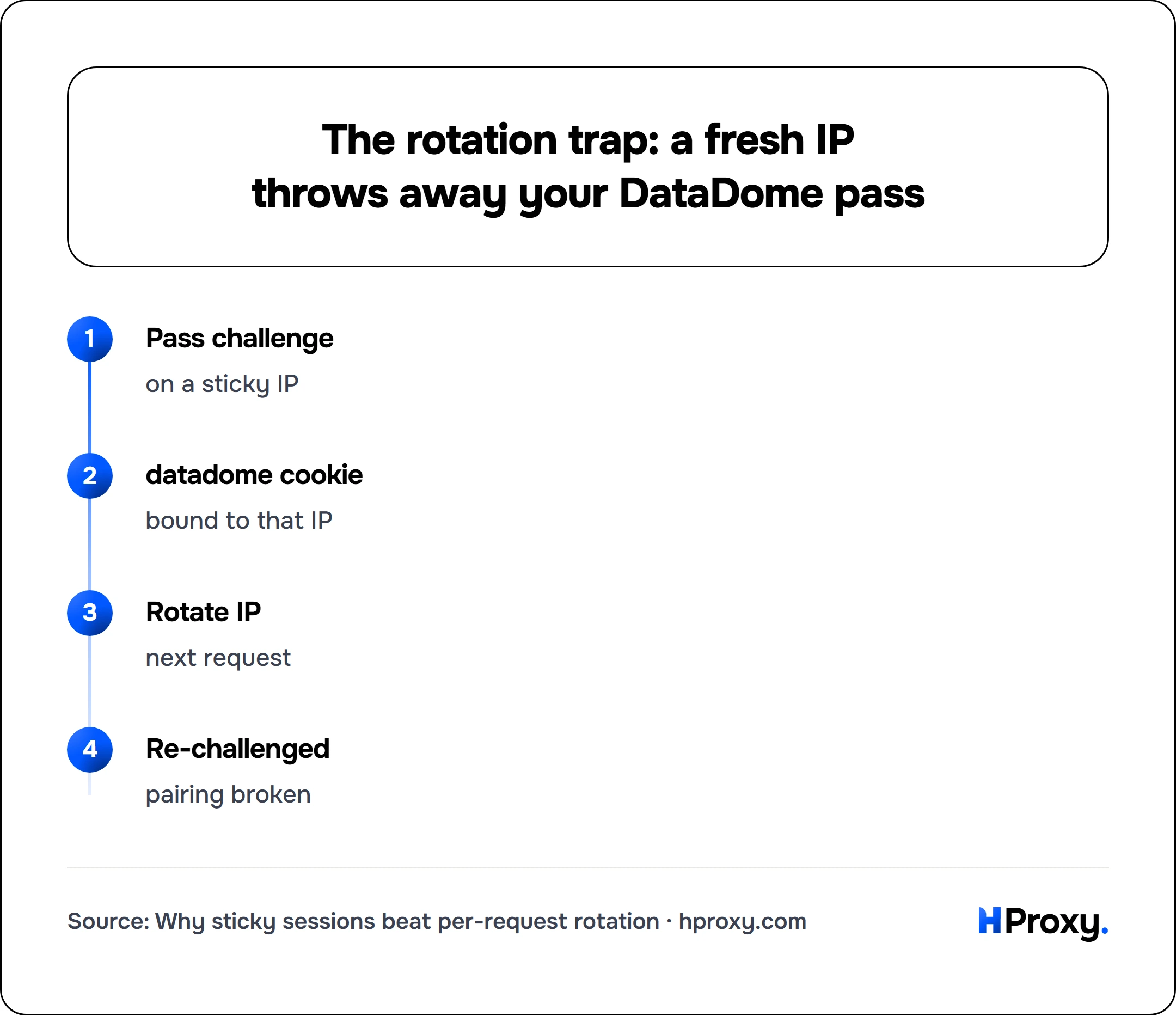
Here is the nuance most guides miss. Once you clear a challenge, the datadome cookie is bound to that IP and device signature. Rotate to a new IP on the next request and the cookie no longer matches its origin, so DataDome re-challenges you as if you were brand new. The winning pattern is the opposite of machine-gun rotation:
- Sticky sessions per flow. Hold one residential IP for the whole of a single browsing session so the cookie, IP, and fingerprint stay consistent.
- Rotate between flows, not inside them. New session, new identity, new IP.
Pass challenge
on a sticky IP
datadome cookie
bound to that IP
Rotate IP
next request
Re-challenged
pairing broken
In practice that means reusing one exit for the session and letting cookies persist, instead of grabbing a fresh IP each call:
import requests

session = requests.Session()                      # persists the datadome cookie for us
proxy = "http://user:pass@198.51.100.24:8080"     # one sticky exit for the whole flow
session.proxies = {"http": proxy, "https": proxy}

session.get("https://example.com/login")          # clears the challenge, sets the cookie
session.get("https://example.com/search?q=widgets")  # same IP + cookie, stays trusted
Rotating too fast against DataDome is a classic self-inflicted wound, the same trap as rotating mid-session on any stateful target.
The half proxies cannot touch
Give DataDome a flawless residential IP and a default headless browser, and it still catches you, because the other two signals never changed. That is the ceiling on what any proxy can do.
Fingerprint
Send requests with a raw HTTP library and your TLS and HTTP/2 fingerprint scream automation no matter how clean the IP. Drive a stock headless browser and the JavaScript check finds navigator.webdriver, a HeadlessChrome user-agent, missing plugins, and a dozen other tells. The IP says human, the fingerprint says bot, and that mismatch is itself a strong bot signal.
Behavior
Even with a perfect IP and fingerprint, requesting fifty pages in fifty seconds with no mouse movement and no variation profiles you as a script. DataDome's behavioral layer is built precisely to catch the thing a proxy cannot disguise: how you act once you are in.
The mental model is the same one behind all web scraping with proxies: the proxy makes your IP believable, and your fingerprint and pacing make the rest of you believable. DataDome scores all three at once, so fixing one while ignoring the other two still sinks you.
The proxy fixes
IP reputation
a home ISP reads as a person, not a datacenter
The instant datacenter block
you clear the reputation gate
Per-IP volume
rotating between flows keeps each IP quiet
Still on you
TLS and HTTP/2 fingerprint
a raw client still says automation
Browser check and the datadome cookie
the JS layer needs a real browser
Behavior over a session
pacing and mouse movement you control
A setup that actually gets through
There is no single trick in it. Getting past a real DataDome deployment means lining up all three signals, and proxies are one third of that:
- Route through rotating residential IPs, with sticky sessions held for the length of each flow. This clears the reputation gate.
- Answer the JavaScript layer. A properly patched automation browser (the hardened Playwright and Puppeteer variants, or an anti-detect browser) produces a genuine browser fingerprint as a side effect and hides the
webdrivertells. If you must use an HTTP client, one that impersonates a browser's TLS fingerprint is the minimum, and a solver API can supply the challenge payload itself. Both routes are covered below. - Make the user-agent, TLS fingerprint, and IP geography agree. A German residential IP with a US-English headless Chrome and a Python TLS signature is three contradictions in one request. Consistency is the whole game.
- Pace like a person. Randomized delays, real dwell time on pages, no perfectly even intervals. Slower and unblocked beats fast and challenged.
- Persist the
datadomecookie across the session on the same sticky IP, so once you pass you stay passed.
Expect to still meet a CAPTCHA sometimes. On a mature DataDome setup that is the behavioral layer asking for more proof, not a proxy failure, and no proxy tier removes it. Our guide on why you keep hitting reCAPTCHA covers the solve-versus-prevent tradeoff, and scraping past Cloudflare handles the other major vendor.
The three challenges DataDome actually serves
DataDome is worth separating from the other vendors on one point: it does not have a single challenge, it has three, and they need different answers. Knowing which one you were served saves a lot of guessing.
The 403 interstitial
The common one. DataDome returns a 403 carrying a JavaScript device-fingerprint challenge that reads canvas, WebGL, timing and navigator entropy, and it expects an encrypted payload proving a real browser ran it before it will issue a valid datadome cookie. It usually fires on the first request from a fresh or low-trust client, which is why it feels like an instant block.
The slider captcha
A visual puzzle asking you to drag a piece into a matching gap. This one needs actual image analysis rather than a plausible-looking offset, which is why naive automation fails it consistently.
Tags telemetry
The interesting one, because it runs before anything goes wrong. DataDome scores sessions continuously, and trust telemetry sent during normal browsing raises that score. Most people only think about challenges reactively, after a block. Feeding the tags endpoint is the preventive half, and it is the reason two sessions with identical IPs and fingerprints can have very different block rates.
Answering these without a browser is what Hyper Solutions built their DataDome product for: an interstitial payload from the device-check HTML, automatic slider solving, and tags generation for the proactive side. The same division of labour applies as everywhere else in this guide. You still make every request through your own proxies, and the payload they generate is bound to the exit IP you declare, so it has to match the address you actually leave from.
Their own product page is unusually candid about the limit of that, and it is worth quoting because it is the whole argument for the proxy half: DataDome penalises known datacenter and proxy ranges on sight, regardless of how clean your payload is. A perfect challenge answer does not survive a reputation verdict reached before the challenge was ever served.
Test before you scale
Before you point a real job at a defended target, confirm your exits are actually alive and residential. A pool full of dead or mislabeled IPs reads as failure when the real problem is the proxy, not DataDome. Run candidates through the proxy checker to verify each exit responds and presents the geography you expect, then prove your full setup (IP, browser fingerprint, pacing) against one page before scaling to thousands. Testing one identity end to end tells you which of the three signals is failing, which is the only way to fix the right thing.
Proxies solve one third of this
DataDome scores three things: your IP, your fingerprint, and your behavior. Residential proxies fix the first completely and are the non-negotiable foundation, since datacenter IPs never make it past the reputation gate. But they do nothing for the other two. A clean rotating residential pool with sticky sessions gets you to the table; a realistic browser fingerprint and human-like pacing are what let you stay. Anyone selling residential proxies as a one-click DataDome bypass is skipping the two thirds of the problem that proxies were never able to solve. Get all three right and DataDome stops being a wall and becomes a checklist.
When the wall is not your problem to solve
Before committing to a DataDome bypass, check whether someone has already committed to it for you. Our scraper APIs cover a set of platforms end to end and return parsed JSON from a single call, anti-bot layer included, so the detection changes land on us instead of your pipeline. Build the bypass for targets outside that list, where there is no alternative.
Sources
- DataDome: AI threat detection: the signature, behavioral, and reputational models, including residential proxy detection.
- Hyper Solutions, DataDome Bypass API: the three challenge types (403 interstitial, slider captcha, tags telemetry), the device-check flow behind the interstitial, and the statement that datacenter and proxy ranges are penalised on sight regardless of payload quality.
- Provenance on the Hyper Solutions material above: they sell DataDome bypass tooling, so they have a commercial interest in the system reading as both formidable and beatable. The technical detail is specific and nobody else publishes it, which is why those claims stay on this page, but weigh the framing with that interest in mind. Not linked here.
- JA3 (Salesforce) and JA4 (FoxIO): the TLS ClientHello fingerprints DataDome reads.
- Akamai: Passive Fingerprinting of HTTP/2 Clients: the HTTP/2 fingerprint behind the "shape of your frames".