Every proxy provider's homepage makes the same promises: millions of ethically sourced IPs, 99.9% uptime, the cleanest pool in the business. None of it is testable from the page, and some of it is not true. To vet a proxy provider properly you have to stop reading the marketing and start testing the actual IPs, because the IPs are the one part of the pitch that cannot lie to you.
We run a proxy network, so this is the exact test we would run on a competitor before trusting them with a single request. It uses tools you already have for free: a proxy checker, a fraud-score engine, and two commands. Learn to choose a proxy provider this way and the sales copy stops mattering, because a trial IP either passes these checks or it does not.
How do you vet a proxy provider before buying?
Get trial IPs, then verify them yourself. Run each one through a proxy checker and a fraud-score engine to confirm the real exit location, ASN and risk score. Inspect whether the network is genuinely residential or datacenter relabeled, test pool size and geo coverage, and measure uptime over a full day before you commit.
Test the IPs, not the landing page
The whole pitch (pool size, sourcing, uptime, "premium" quality) is unverifiable from the outside. What is verifiable is a small sample of the actual product. So the entire vetting process comes down to one move: get a few real IPs into your hands and interrogate them until they either hold up or fall apart. Everything below is how you run that interrogation.
The pre-purchase test
1. Get trial IPs before you commit
Start by getting the product into your hands cheaply. Look for a free trial, a small pay-as-you-go minimum, or at least a refund window. You do not need much: a dollar or two of pay-as-you-go traffic gives you real IPs to test, which is all the rest of this checklist needs. A provider that will not let you touch the pool without a large upfront plan has already failed the first test, and we cover why in the red flags below.
2. Run every IP through a checker and a fraud engine
This is the step that catches most lies. A proxy checker makes a real connection through the proxy and reports the true exit location, the anonymity grade, and the network the IP actually belongs to, so a "US residential" IP that is really a German datacenter gets exposed on the spot. Drop each trial IP into our proxy checker and read what comes back, not what the label claims.
Then take the exit IP and score it on a fraud engine. Because we also run one, the FFraud IP-intelligence engine, we can tell you the results are often unkind: we once pulled a "clean" free proxy and it came back rated 80 out of 100 for risk, flagged as a commercial VPN in a high-risk block (the full story is in are free proxies safe). A website does not need to catch your traffic doing anything to distrust an IP that already carries a reputation like that. One command shows the exit you are really getting:
# The real exit IP a trial proxy hands you, then score that IP
curl -x http://USER:PASS@203.0.113.10:8080 -s https://api.ipify.org
# -> 198.51.100.42   (paste this into a checker and a fraud engine)
3. Inspect the ASN mix: real residential or datacenter relabeled
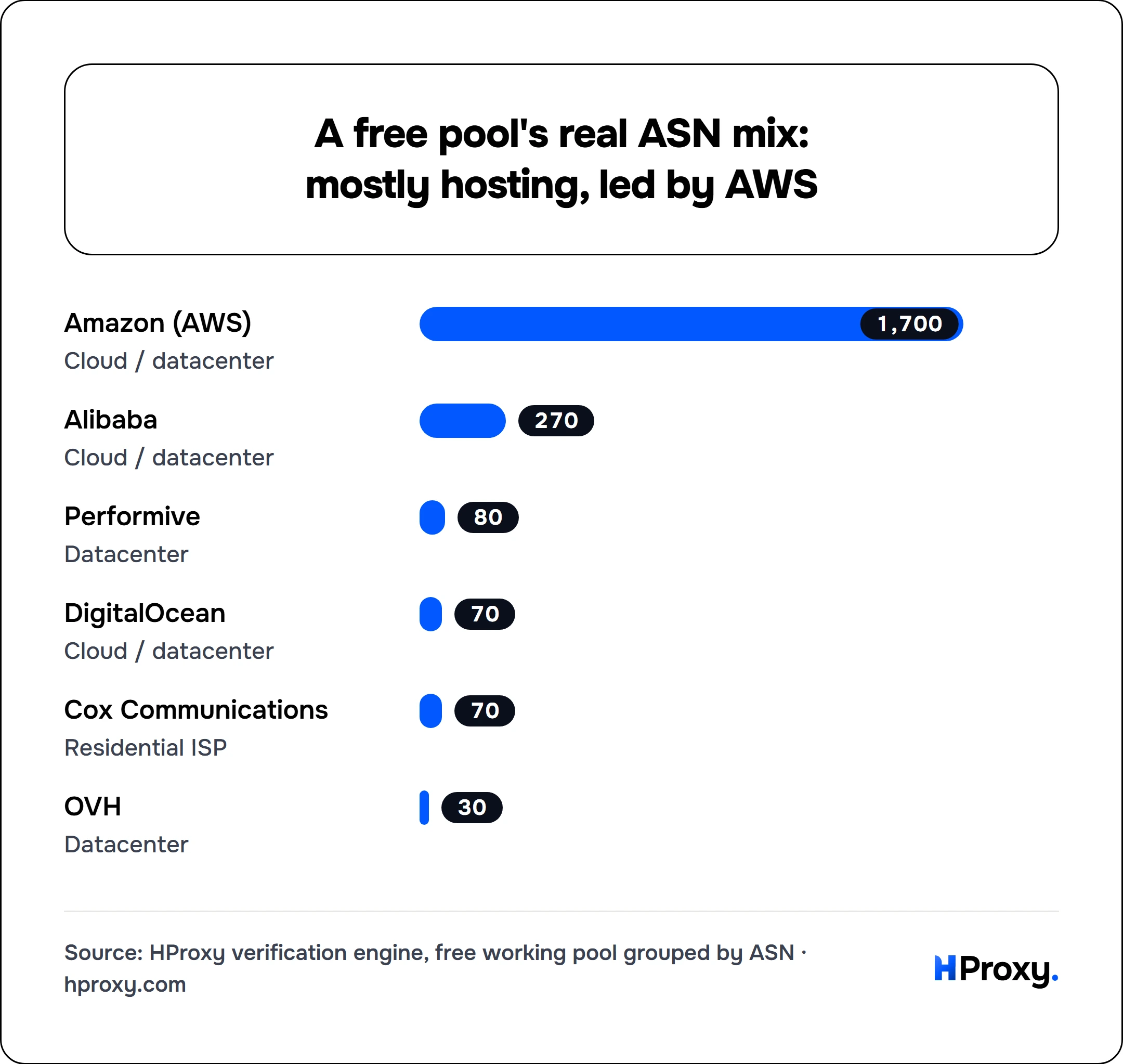
The most common dishonesty in this industry is selling datacenter IPs as residential, and the ASN (the network an IP is registered to) gives it away every time, because it is the exact signal defended sites read to detect a proxy. That mapping is public by design: IANA allocates IP ranges and AS numbers to the five Regional Internet Registries (ARIN, RIPE NCC, APNIC, LACNIC, AFRINIC), which publish who holds each block, so a checker or fraud engine can name the owning network in seconds and no relabeling survives it. Genuinely residential IPs sit under consumer ISPs like Comcast, Cox or Deutsche Telekom. Datacenter IPs wearing a residential label sit under hosting networks like AWS, OVH, DigitalOcean or Alibaba. Pull ten to twenty trial IPs, look up the ASN of each, and count. Our free proxy data study found the free pool is overwhelmingly datacenter, led by AWS, and the same tell works on a paid pool: if most of your "residential" trial IPs trace back to cloud hosts, you are buying datacenter traffic at a residential price.
Our own free pool shows exactly that shape when you group it by network, mostly cloud hosts with a lone consumer ISP as the exception:
4. Test pool size and geo coverage where you actually need it
Ignore the headline "150 million IPs" figure. You cannot verify a number that large, and it does not help you if none of those IPs are in the city you need. Test what you can actually measure: ask for your target country or city, pull twenty sessions, and count how many distinct exit IPs come back and how many land in the right place. A pool that returns the same three IPs for "rotating residential in Brazil" is not the pool the page describes. What "good coverage" even means depends on whether you need rotating or static residential, so test for the type you will actually buy.
5. Measure uptime over a day, not a minute
One working IP at signup proves nothing. Providers that resell a flaky upstream look fine for the first request and fall over an hour later. Put a trial IP or gateway on a simple loop for a few hours and log the success rate and latency. If it holds steady across the day, that is a real signal. If it drops requests or crawls under sustained use, you found that out for a dollar instead of for a month's plan.
Red flags before you pay
Fake or flagged Trustpilot reviews
A wall of generic five-star reviews posted in a tight cluster of dates is a bought reputation, not an earned one. Read the one, two and three-star reviews first: they are where real problems (dead IPs, refused refunds, silent bans) actually surface. Specific, varied, occasionally critical reviews are a better sign than a spotless five-star average.
White-label clones that share identical copy
A large share of "proxy providers" are the same pool behind different logos. If a site's headlines, feature list and FAQ are word for word identical to three other brands, you are looking at a white-label reseller adding a markup over an upstream you could often reach directly. Paste a distinctive sentence from the site into a search engine, and if it turns up on five other domains, treat the brand as a reseller and price it accordingly.
No trial, no refund, no way to test
A provider confident in its pool lets you verify it. One that offers no trial, no refund, and only large plans up front is asking you to pay before you can check a single claim on its page. That is the single biggest red flag, because it removes the only leverage you have.
Vague or evasive sourcing
Ask a simple question: what kind of network are these IPs on, and how were they obtained. A provider with clean sourcing can answer plainly. Evasive, buzzword answers ("proprietary premium sources") often sit on top of pools you would not knowingly buy, including IPs taken from users who did not meaningfully consent. Vague sourcing is both an ethics problem and a quality problem, because you cannot vet what they will not describe.
KYC-heavy, enterprise-only sales
Some providers hide all pricing behind a "contact sales" wall and route every buyer through KYC and a call, even for a small standard purchase. For a large enterprise that paperwork is sometimes a feature, and we said so plainly in our HProxy vs Bright Data comparison. For everyone else it is friction that exists to anchor you to a big contract before you have tested anything. If you cannot see a price or buy a small amount without a sales call, that tells you who the product is really for.
What a good proxy provider looks like
Flip every red flag and you have the profile of a provider worth buying from. Pricing is public and per-unit (per GB or per IP), not hidden behind a form; what proxies actually cost is the benchmark to hold it against. There is a real trial or a low pay-as-you-go minimum, so you can run the test above before committing. Sourcing is described in plain terms, and the IPs survive a checker and a fraud engine instead of failing them. Coverage holds up in the specific places you need, and uptime stays steady across a day of real use. None of that is a promise you have to take on faith. All of it is something you just measured.
The vetting checklist
| Check | How to test it | Green light |
|---|---|---|
| Trial access | Sign up and get trial or pay-as-you-go IPs | Free trial, refund, or a low minimum |
| Real exit and ASN | Run each IP through a proxy checker | Exit matches the claim, network fits the type sold |
| Fraud reputation | Score the exit IP on a fraud engine | Low risk score, not flagged as VPN or hosting |
| Residential vs datacenter | Look up the ASN of 10 to 20 IPs | Consumer ISPs, not AWS, OVH or other hosts |
| Pool and geo | Pull 20 sessions in your target country | Many distinct IPs, landing in the right place |
| Uptime | Loop a trial IP for a few hours | Steady success rate and latency |
| Pricing | Read the pricing page | Public per-GB or per-IP, no forced sales call |
| Reputation | Read the critical reviews, not the average | Specific and varied, not clustered five-stars |
Vet us the same way
We would rather you test HProxy than trust this article. Take any HProxy IP, run it through our free proxy checker to see the real exit and network, then score that same IP on the FFraud engine to see how it rates against the whole internet. If it passes both, and we think it will, you can start on residential at $0.44/GB pay as you go, with no sales call and no commitment. Every item on that checklist that concerns us specifically is answered plainly in our FAQ, verification, refunds and what a balance does when you stop using it included. Apply the exact test above to us, and to everyone else you are considering. The provider that holds up under it is the one to buy.