
On httpx 0.28 you pass one proxy URL to the client through the proxy argument. Every request that client makes then goes through the proxy, and the whole setup takes five lines.
import httpx

with httpx.Client(proxy="http://user:pass@host:port") as client:
    r = client.get("https://httpbin.org/ip")
    print(r.status_code, r.json())
We ran exactly this code on September 2, 2026, against a public entry from our free list. The target answered with the address of the proxy, not with ours.
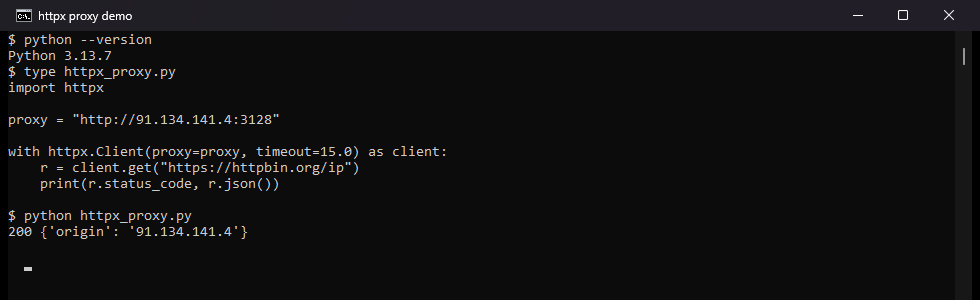
If your code says proxies= instead, it stops with a TypeError on every httpx released after November 2024. The fix is one word, and the next section shows it. The rest of this page is the same code path, measured. It covers routing per host with mounts, async clients, SOCKS5 and the environment variables. It also lists the exact error for each way a proxy can fail.
What you need before you start
- Python 3.8 or newer, because the 0.28.1 release lists 3.8 as its floor on PyPI (December 2024).
- The library itself:
pip install httpx, orpip install "httpx[socks]"if you will use SOCKS5. - A proxy URL in the form
scheme://user:pass@host:port. For a first test, any entry from our free proxy list will do. - Your httpx version, because it decides which argument name works. Print it with
python -c "import httpx; print(httpx.__version__)".
| httpx version | released | what works |
|---|---|---|
| 0.25 and older | before December 2023 | proxies= only; proxy= raises TypeError (measured on 0.24.1). |
| 0.26 and 0.27 | December 2023 to August 2024 | proxy= and mounts=; proxies= still works with a DeprecationWarning (measured on 0.27.2). |
| 0.28.0 and 0.28.1 | November and December 2024 | proxy=, mounts= and socks5h://; proxies= raises TypeError (measured on 0.28.1). |
The dates come from the httpx changelog and PyPI, and every example below targets 0.28.1, the current release.
Why does my code fail with "unexpected keyword argument 'proxies'"?
Because the argument no longer exists. Version 0.26.0 (December 20, 2023) added the singular proxy and deprecated proxies, and version 0.28.0 (November 28, 2024) removed it. These are the two messages on 0.28.1, copied from our run.
TypeError: Client.__init__() got an unexpected keyword argument 'proxies'
TypeError: get() got an unexpected keyword argument 'proxies'
On 0.27.2 the same call still works, but Python prints a warning that names the replacement.
DeprecationWarning: The 'proxies' argument is now deprecated. Use 'proxy' or 'mounts' instead.
The removal broke more than hand-written scripts. On the day 0.28.0 shipped, the OpenAI Python SDK failed with the same TypeError. It had passed proxies through to httpx, and openai 1.55.3 fixed that the same day (openai-python issue 1902). The Anthropic SDK had the same problem until version 0.45.2, per the accepted Stack Overflow answer from February 2025. If the traceback ends inside a library you did not write, upgrade that library before you touch httpx.
Step 1: one proxy for everything
Replace the keyword, and nothing else changes.
# before 0.28
client = httpx.Client(proxies="http://user:pass@host:port")

# 0.28 and later
client = httpx.Client(proxy="http://user:pass@host:port")
Step 2: a proxies dict becomes mounts
The old per-scheme dict maps to mounts, where each key carries an httpx.HTTPTransport with its own proxy.
# before 0.28
proxies = {"http://": "http://host:8080", "https://": "http://host:8080"}
client = httpx.Client(proxies=proxies)

# 0.28 and later
mounts = {
    "http://": httpx.HTTPTransport(proxy="http://host:8080"),
    "https://": httpx.HTTPTransport(proxy="http://host:8080"),
}
client = httpx.Client(mounts=mounts)
Step 3: the top-level functions
httpx.get(url, proxy="http://...") works, while httpx.get(url, proxies=...) raises the second TypeError above. The same applies to httpx.post and the other shortcuts.
| you had | you write now |
|---|---|
Client(proxies="http://...") | Client(proxy="http://..."). |
Client(proxies={"http://": ..., "https://": ...}) | Client(mounts={"http://": HTTPTransport(proxy=...), ...}). |
httpx.get(url, proxies=...) | httpx.get(url, proxy=...). |
How do I send some hosts through a proxy and others directly?
With mounts, a dictionary that maps URL patterns to transports. HTTPX matches the most specific pattern first. A pattern mounted to None means no proxy for those requests. The patterns below come from the httpx transports documentation.
import httpx

mounts = {
    "all://": httpx.HTTPTransport(proxy="http://user:pass@host:8080"),   # default
    "all://*.internal.example": None,                                   # direct
    "all://*.scrape-target.com": httpx.HTTPTransport(proxy="http://other:8080"),
}
with httpx.Client(mounts=mounts) as client:
    client.get("https://api.internal.example/health")   # no proxy
    client.get("https://www.scrape-target.com/")        # second proxy
    client.get("https://example.org/")                  # default proxy
| pattern | matches |
|---|---|
all:// | every request, any scheme. |
https:// | HTTPS requests only. |
all://example.com | that host exactly. |
all://*example.com | the host and every subdomain. |
all://*.example.com | subdomains only. |
https://example.com:1234 | that host and port over HTTPS. |
Two details come from our measurement. First, a None mount really bypasses the proxy. We pointed all:// at a proxy with a wrong password and mounted all://httpbin.org to None. The request to httpbin.org succeeded, and a request to example.com failed with the 407 from the proxy. Second, mounts beats proxy= when both are set, because HTTPX applies the mounts afterwards. Client(proxy=bad, mounts={"all://httpbin.org": None}) reached httpbin.org directly.
The same rule explains a 2020 question on Stack Overflow. The poster used http without :// as the only key and requested an https site, so nothing matched. The site saw the address of the poster. Use all://, or list both schemes.
Why does the proxy URL start with http:// for an https:// site?
Because the connection to the proxy and the connection to the site are two different things. The httpcore documentation, the layer under httpx, defines both in one line. "Forwarding is a proxy mechanism for sending requests to http URLs via an intermediate proxy. Tunnelling is a proxy mechanism for sending requests to https URLs via an intermediate proxy".
For an https:// target, httpx connects to the proxy over plain HTTP and sends a CONNECT request. RFC 9110 defines that method: the proxy establishes "a tunnel to the destination origin server". It then limits itself to "blind forwarding of data, in both directions". The TLS handshake with the site happens inside the tunnel, and the proxy never decrypts anything.
httpx.Client
proxy= / mounts=
Transport
CONNECT tunnel
Proxy
adds auth, exits
Target
sees the exit IP
Hence the httpx docs note that an https:// key "should use the http:// scheme". The docs add that this is not a typo. We tried the wrong scheme against a plain HTTP proxy. httpx waited 10.9 seconds for a TLS handshake the proxy never offered, then failed.
httpx.ConnectError: [SSL: UNEXPECTED_EOF_WHILE_READING] EOF occurred in violation of protocol
An https:// proxy URL is right only when the proxy itself terminates TLS. httpx has supported those since 0.25.0 (September 2023), and your provider will say so if that is what you have.
HTTP/2 works through the tunnel, with httpx.Client(http2=True) and the h2 package installed. Our request to www.python-httpx.org reported HTTP/2 three times: direct, through a local proxy, and through a public proxy. Without the flag every request is HTTP/1.1. The hop to the proxy itself stays HTTP/1.1, which is all httpcore supports for that leg.
How do I add a username and password?
Put the credentials in the userinfo part of the URL, user:pass@host:port, exactly as with requests and curl.
import httpx

with httpx.Client(proxy="http://myuser:mypass@host:8080") as client:
    r = client.get("https://httpbin.org/ip")
    print(r.json())
Wrong or missing credentials produce a 407, but not always in the same shape. We measured both against a local proxy that requires Basic auth.
| target | what a wrong password does |
|---|---|
https:// site (tunnel) | raises httpx.ProxyError: 407 Proxy Authentication Required. |
http:// site (forwarding) | no exception; the response has status 407 and a Proxy-Authenticate: Basic header. |
A script that only catches exceptions can miss a 407 on plain HTTP targets, so check r.status_code too. RFC 9110 requires the proxy to send Proxy-Authenticate with every 407. That header tells you the proxy is alive and only the credentials are wrong. The dedicated fix list is in how to fix 407 Proxy Authentication Required.
Special characters in a password need care, so we tested six on httpx 0.28.1.
| password contains | pasted raw | with quote(pw, safe="") |
|---|---|---|
@ | works, httpx splits on the last @ | works. |
: | works | works. |
/ | httpx.InvalidURL: Invalid port: 'pa' | works. |
# | httpx.InvalidURL: Invalid port: 'pa' | works. |
| space | works | works. |
% | works in our test | works. |
The safe way is to encode the password once.
from urllib.parse import quote

password = quote("pa/ss#word", safe="")
proxy = f"http://myuser:{password}@host:8080"
The safe="" matters: the Python default for quote leaves / unencoded, because the function was written for URL paths.
Does the same code work with AsyncClient?
Yes, httpx.AsyncClient takes the same proxy and mounts arguments, and awaiting the requests is the only change.
import asyncio
import httpx

async def main():
    async with httpx.AsyncClient(proxy="http://user:pass@host:port") as client:
        r = await client.get("https://httpbin.org/ip")
        print(r.json())

asyncio.run(main())
For async mounts, use httpx.AsyncHTTPTransport(proxy=...) instead of HTTPTransport. We put the synchronous class into an AsyncClient by mistake, and the error does not name the cause.
AttributeError: 'HTTPTransport' object has no attribute '__aenter__'
Async pays off when many requests share one proxy. We sent ten requests through one public entry from our list on September 2, 2026.
| ten requests to httpbin.org/ip through one free proxy | wall time | succeeded |
|---|---|---|
Client, one request after another | 4.12 s | 10 of 10. |
AsyncClient with asyncio.gather, all ten at once | 1.17 s | 10 of 10. |
AsyncClient, limited to three at a time with a semaphore | 1.96 s | 10 of 10. |
One warning comes from an earlier run the same morning. A different free entry accepted ten sequential requests but dropped five of ten concurrent ones. A semaphore that caps concurrency per proxy is cheap insurance.
How do I use a SOCKS5 proxy?
HTTPX speaks HTTP proxies out of the box and needs one extra for SOCKS.
pip install "httpx[socks]"
That installs socksio, the SOCKS state machine httpcore uses, and a socks5:// URL then goes into proxy.
import httpx

with httpx.Client(proxy="socks5://user:pass@host:1080") as client:
    r = client.get("https://httpbin.org/ip")
    print(r.json())
Port 1080 is the conventional SOCKS port per RFC 1928. The username and password method of that RFC is what the userinfo maps to. Without the extra, httpx stops before any network traffic.
ImportError: Using SOCKS proxy, but the 'socksio' package is not installed. Make sure to install httpx using `pip install httpx[socks]`.
socks5h:// is the same protocol with one difference: the proxy resolves the hostname instead of your machine. SOCKS5 has a domain-name address type for exactly this, and httpx accepts the socks5h scheme since 0.28.0. On 0.27.2 the same URL fails with ValueError: Unknown scheme for proxy URL. Use it when the DNS lookup itself must not leave through your own connection. The accepted schemes on 0.28.1 are http, https, socks5 and socks5h, and a socks4:// URL fails at once.
ValueError: Unknown scheme for proxy URL URL('socks4://127.0.0.1:1080')
SOCKS4 needs the third-party httpx-socks transport, which supports SOCKS4(a), SOCKS5(h) and HTTP CONNECT. For the protocol itself, see what is a SOCKS5 proxy.
A note on free SOCKS entries, from 10:14 UTC on September 2, 2026. None of 40 public socks5:// entries from our list answered a request. One of the same 40 answered as socks5h://. Almost all failed with ConnectError inside the 10 second timeout. A second run on our side at 10:29 UTC probed 15 other public socks5 entries. Every one failed with CERTIFICATE_VERIFY_FAILED: the entry answered, but with a certificate from an unknown issuer. Treat a public SOCKS entry as hostile until a checker clears it. Never fix that error with verify=False. The HTTP side of the scan is in the verification section.
Why is HTTPX using a proxy I never set?
Because it trusts the environment by default, and the variables are HTTP_PROXY, HTTPS_PROXY and ALL_PROXY. The httpx documentation says they "set the proxy to be used for http, https, or all requests respectively". NO_PROXY "disables the proxy for specific urls". On Windows and macOS, httpx also reads the system proxy settings through the getproxies() function of Python. A comment in the httpx source says so.
We set HTTPS_PROXY to a proxy with a wrong password and ran four calls.
| call | result |
|---|---|
httpx.get(url) | ProxyError: 407, so the variable was used. |
httpx.get(url, trust_env=False) | direct, 200. |
httpx.get(url, proxy="http://good@...") | 200 through the explicit proxy, which wins. |
httpx.get(url) with NO_PROXY=httpbin.org | direct, 200. |
The NO_PROXY matching rules are in the same source file, not on the docs page.
NO_PROXY value | effect |
|---|---|
example.com | bypasses example.com and every subdomain. |
.example.com | bypasses subdomains only, not example.com itself. |
192.168.0.10, ::1, localhost | bypasses that address or name. |
* | disables every proxy from the environment. |
For a proxy you cannot afford to have overridden, set proxy= on the client. For a client that must never use one, pass trust_env=False.
What do the errors mean, and how do I fix them?
Every message below comes from our own runs on httpx 0.28.1 on September 2, 2026. The OS-level text in the refused-connection case follows your system language, and ours is German.
| what you see | why | fix |
|---|---|---|
TypeError: ... unexpected keyword argument 'proxies' | removed in 0.28.0 | proxy= or mounts=. |
httpx.ProxyError: 407 Proxy Authentication Required | wrong or missing credentials, https target | fix the URL and encode the password. |
r.status_code == 407, no exception | same, on an http target | check the status code. |
httpx.InvalidURL: Invalid port: '...' | / or # in the password | quote(password, safe=""). |
httpx.ConnectError: [SSL: UNEXPECTED_EOF_WHILE_READING] | https:// scheme for a plain proxy | use http://. |
httpx.ConnectTimeout: timed out after about 5.5 s | the proxy address does not answer | shorter connect timeout, next proxy. |
httpx.ConnectError: [WinError 10061] ... (refused) | nothing listens on that port | the entry is dead, next proxy. |
httpx.ProxyError: 400 Bad Request | the proxy refused the CONNECT tunnel | the entry does not tunnel HTTPS, next proxy. |
httpx.RemoteProtocolError: Server disconnected without sending a response. | the proxy dropped the connection | next proxy. |
httpx.ConnectError: [SSL: CERTIFICATE_VERIFY_FAILED] via a proxy | the proxy intercepts TLS | drop the entry, never verify=False. |
ImportError: Using SOCKS proxy, but the 'socksio' package is not installed | no SOCKS extra | pip install "httpx[socks]". |
ValueError: Unknown scheme for proxy URL | socks4:// or a typo | http, https, socks5 or socks5h. |
AttributeError: 'HTTPTransport' object has no attribute '__aenter__' | sync transport in an AsyncClient | AsyncHTTPTransport. |
Timeouts
HTTPX applies a default timeout of 5 seconds to every phase, so a silent proxy cannot hang your program. The timeouts documentation has the details. An unroutable proxy failed in our run after 5.55 seconds with ConnectTimeout: timed out. With httpx.Timeout(10.0, connect=2.0) the same failure took 2.54 seconds. Tune the budgets for proxied work, where connecting and reading behave differently.
timeout = httpx.Timeout(connect=5.0, read=30.0, write=10.0, pool=5.0)
with httpx.Client(proxy="http://user:pass@host:8080", timeout=timeout) as client:
    r = client.get("https://example.com")
connect caps the wait for the proxy to accept the connection. read caps the wait for data once connected. A slow proxy trips the read budget, an unreachable one trips the connect budget.
Retries
httpx.HTTPTransport(retries=2, proxy=...) retries a request when the connection fails, and only then. The docs limit it to ConnectError and ConnectTimeout. On a closed port, two retries still ended in ConnectError after 2.3 seconds. Retries help with a flaky network, not with a dead proxy.
Catching them
All network errors above inherit from httpx.HTTPError, and so do the status errors from raise_for_status(). One except httpx.HTTPError covers the whole proxy path. Catch httpx.ProxyError separately when you want to drop that proxy from a pool.
How do I check that the proxy really carries my traffic?
Never assume. Compare what the target sees with and without the proxy before you trust an exit with real traffic.
import httpx

proxy = "http://user:pass@host:8080"

real = httpx.get("https://httpbin.org/ip", timeout=10.0).json()["origin"]
via = httpx.get("https://httpbin.org/ip", proxy=proxy, timeout=15.0).json()["origin"]

print("direct:", real)
print("proxy: ", via)
assert real != via, "the proxy is not changing your IP"

headers = httpx.get("https://httpbin.org/headers", proxy=proxy, timeout=15.0).json()["headers"]
leak = {k: v for k, v in headers.items() if k.lower() in ("x-forwarded-for", "via", "forwarded")}
print("proxy headers seen by the target:", leak or "none")
If the two origins match, the request never went through the proxy. The second call matters as well, because a transparent proxy can forward your real address in X-Forwarded-For. The origin then looks changed while the target still learns who you are.
We ran this against public entries from our own free list, pulled with the API at that minute.
| scan on September 2, 2026 | entries tested | alive | most common failure | fastest alive |
|---|---|---|---|---|
http://, 10:14 UTC | 40 | 5 | ProxyError: 400 Bad Request (29) | 3.29 s. |
http://, 10:20 UTC | 60 | 9 | ProxyError: 400 Bad Request (36) | 4.6 s. |
socks5://, 10:14 UTC | 40 | 0 | ConnectError (36) | none. |
socks5h://, 10:14 UTC | 40 | 1 | ConnectError (37) | 16.75 s. |
Every alive entry changed the origin to its own address. None forwarded our real address in a header. The fastest entry from the first scan was dead six minutes later. That is the free path: it works for a test, and it stops working while you watch. Our proxy checker runs the same battery in one paste: exit IP, anonymity grade, geolocation and latency. When a project needs exits that stay alive, our residential pool is the next step. It gives one endpoint and a fresh IP per request, and the code above does not change.
How do I rotate through a list?
The proxy is fixed when a client is built, so rotation means choosing a proxy per client. The version below keeps one client per proxy, which preserves connection pooling. It drops a proxy from the pool when that proxy raises ProxyError.
import random
import httpx

POOL = ["http://203.0.113.7:8080", "http://203.0.113.24:3128", "http://198.51.100.14:8080"]
CLIENTS = {p: httpx.Client(proxy=p, timeout=httpx.Timeout(15.0, connect=5.0)) for p in POOL}

def get_rotating(url, tries=4):
    for _ in range(tries):
        if not CLIENTS:
            break
        proxy = random.choice(list(CLIENTS))
        try:
            r = CLIENTS[proxy].get(url)
            r.raise_for_status()
            return r
        except httpx.ProxyError:
            CLIENTS.pop(proxy).close()     # this exit is gone, stop using it
        except httpx.HTTPError:
            continue                        # timeout or status error, try another
    raise RuntimeError(f"no working proxy for {url}")

html = get_rotating("https://example.com").text
for c in CLIENTS.values():
    c.close()
You do not have to maintain the list by hand. Our free proxy API returns a fresh pool as plain text, and httpx can fetch it.
POOL = httpx.get(
    "https://hproxy.com/api/proxy-list",
    params={"format": "txt", "protocol": "http", "recent": "true", "limit": 50},
    timeout=15.0,
).text.split()
POOL = [f"http://{p}" for p in POOL]
That is the call our scan script used. Expect most entries to fail the first request, as the table shows, and let the loop discard them.
Where to go from here
The proxy side of httpx is small once you are on the current API. The work that remains is the part no client library does for you. Prove each exit before you trust it, and pull from a pool that is alive. The free proxy list re-checks its entries every few minutes. The free proxy API hands them to your script.
The Python requests guide is the direct sibling of this page if you maintain both clients. The cURL guide is the fastest shell-side check of a proxy. Proxies for web scraping covers choosing the proxy type and the request hygiene a client cannot add. When a script outgrows a rotation loop, proxies with Scrapy moves the same logic into a crawling framework. For production, our paid pools give you IPs nobody else is burning. The API documentation covers key creation, ordering and plan generation, with an OpenAPI spec.
Sources
- httpx documentation, Proxies (Encode, docs at release 0.28.1, December 2024). The proxy argument, mounts, the http:// scheme note, forward vs tunnel, the SOCKS extra.
- httpx documentation, Transports and routing (Encode, release 0.28.1, December 2024). Pattern matching order, None mounts, retries.
- httpx documentation, Timeouts (Encode, release 0.28.1, December 2024). The 5 second default and the four budgets.
- httpx documentation, Environment variables (Encode, release 0.28.1, December 2024). HTTP_PROXY, HTTPS_PROXY, ALL_PROXY, NO_PROXY, trust_env.
- httpx changelog (Encode, GitHub, entries 0.17.0 to 0.28.1). Dates of the proxy argument, the proxies removal, socks5h, HTTPS proxies, SOCKS5 and mounts.
- httpx source, _transports/default.py and _utils.py at tag 0.28.1 (Encode, GitHub). Accepted schemes, the SOCKS ImportError text, the NO_PROXY rules.
- httpcore documentation, Proxies (Encode, httpcore 1.0.9, April 2025). Forwarding vs tunneling, HTTP/1.1 to the proxy.
- RFC 9110, HTTP Semantics (IETF, June 2022). Section 9.3.6 CONNECT, section 15.5.8 407, section 11.7 Proxy-Authenticate.
- RFC 1928, SOCKS Protocol Version 5 (IETF, March 1996). Port 1080, authentication methods, the domain-name address type.
- PyPI release history for httpx, httpcore and socksio (read September 2, 2026). Release dates and the Python 3.8 floor.
- Python documentation, urllib.parse.quote (Python Software Foundation, 3.13 docs, September 2026).
- encode/httpx discussion 3420 and openai/openai-python issue 1902 (GitHub, November 28, 2024). The maintainer statement on the removal and the SDK fix.
- Our own measurements on September 2, 2026. httpx 0.24.1, 0.27.2 and 0.28.1 on Python 3.13.7 against a local proxy.py with Basic auth. httpx 0.28.1 against 40 plus 60 public entries from hproxy.com/free-proxy-list. A second run on our side against 15 public socks5 entries at 10:29 UTC.