The ad you approved in the campaign dashboard and the ad a real person sees on their phone in another country are not always the same thing. Creatives break, geo-targeting misfires, publishers swap placements, and some actors deliberately show one version to the ad network and another to the public. Ad verification proxies are how you close that gap: they let you load your own campaigns the way an ordinary local user would, so you observe what actually shipped instead of what was supposed to.
We come at this from both sides. We run a residential and mobile proxy network, and we also run FFraud, an engine that scores IP addresses for fraud and abuse. So we see both the traffic that does the checking and the fraud that tries to hide from it. This guide is what we have learned about why verification needs the right kind of IP, and how to set it up so cloakers cannot spot you coming.
What are ad verification proxies?
Ad verification proxies are residential and mobile IP addresses that let you load your own ads the way a real local user would, from the right country, city, and device. Because ad servers and cloakers treat datacenter IPs differently from home and mobile connections, only genuine-looking IPs reveal what your campaign actually serves.
What ad verification actually checks
Ad verification is the practice of confirming that a live campaign matches what you bought. In plain terms, it answers a handful of questions the campaign dashboard cannot:
- Does the creative render? Broken images, blank frames, and mis-sized units are common, and a dashboard that reports a delivered impression says nothing about whether a human saw a working ad.
- Did geo-targeting work? An ad bought for Germany should appear in Germany and not leak into traffic you never meant to pay for.
- Is the placement brand-safe? You need to know which publishers and which page contexts your ad actually landed next to, not just the network's tidy summary.
- Does the landing page match the offer? Especially in affiliate channels, the page a user reaches is not always the page you approved.
- Is the impression real? Bot traffic, hidden ads, and spoofed domains all bill you for attention that never existed.
Every one of these needs you to observe the ad in the wild, as a normal member of the target audience. That requirement is what turns ad verification from a reporting problem into a proxy problem. Survey research carries the identical requirement, which is why survey proxies are the same residential addresses pointed at questionnaires rather than creatives, so you can confirm your own study renders and submits correctly for every market you invited.
Why it takes residential and mobile proxies
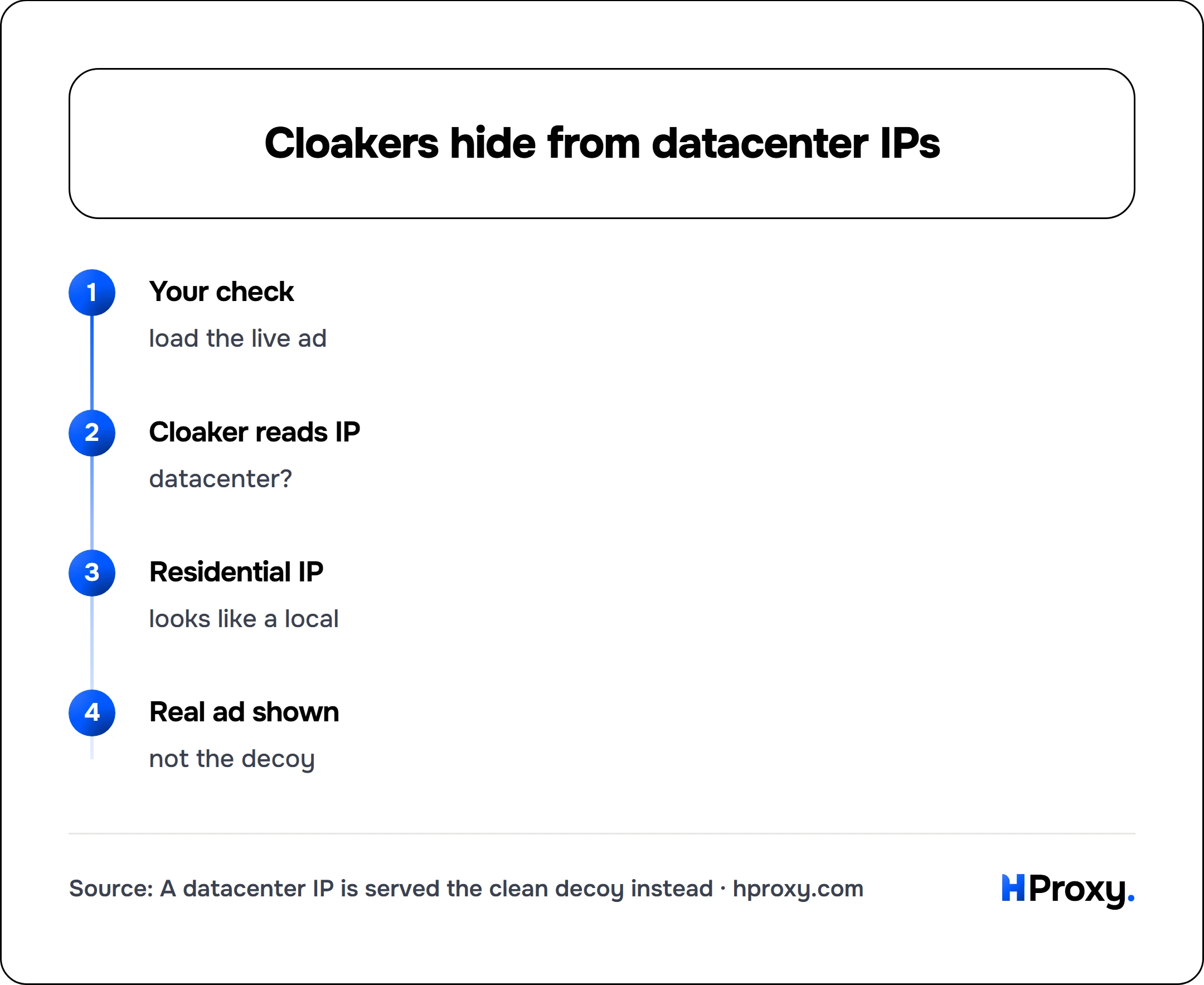
The reason a browser at your desk is not enough comes down to one word: cloaking. Cloaking is the practice of showing different content to different visitors based on who they appear to be. An ad server, an affiliate redirect, or a fraudulent publisher can read your IP address, work out that it belongs to a datacenter or a known verification vendor, and quietly serve a clean, compliant version while real users get something else.
Datacenter IPs are the easiest to catch this way, because their address ranges are registered to hosting companies and trivial to identify. Point verification traffic through them and you often measure the decoy, not the reality. Residential IPs come from real home connections through ordinary ISPs, so they blend into normal audience traffic and get shown the same page everyone else does. When a campaign targets phones, mobile proxies go one step further: they exit through carrier networks, so you look like an actual handset on a cellular connection rather than a computer pretending to be one.
This is the same identity question that runs through all proxy work. Our explainer on rotating vs static residential proxies covers when to rotate and when to hold an IP, and the anti-detection habits in how to avoid IP bans while scraping apply here too: a clean residential IP paired with obvious automation still gives you away.
Your check
load the live ad
Cloaker reads IP
datacenter?
Residential IP
looks like a local
Real ad shown
not the decoy
Catching ad fraud, cloaking, and affiliate fraud
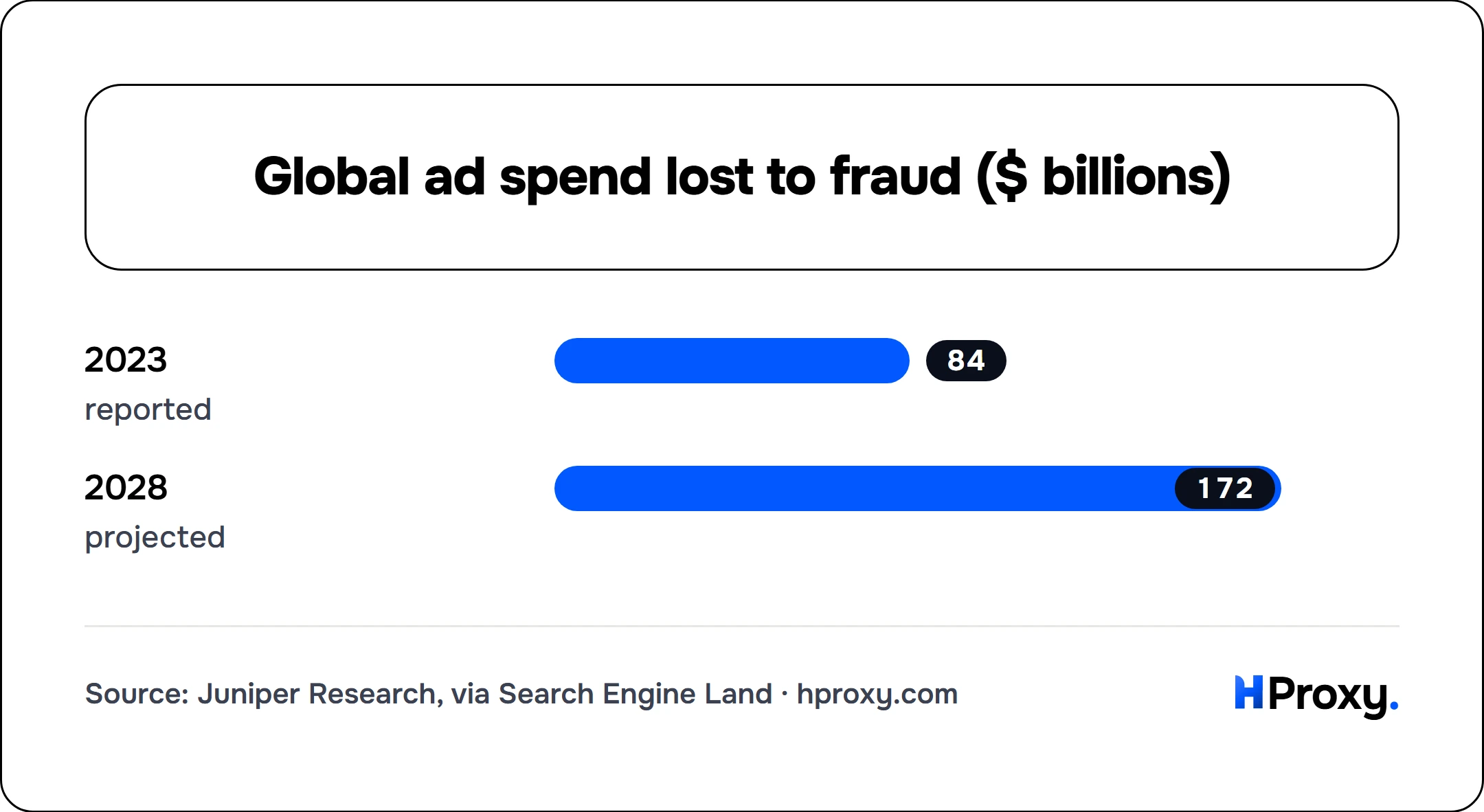
Verification and fraud detection are the same job viewed from opposite ends. The fraud side is a real industry, and a large one: Juniper Research put global advertising spend lost to fraud at $84 billion in 2023 and projected it to reach $172 billion by 2028 (reported by Search Engine Land). Invalid traffic (bots, hidden ads, spoofed domains) is the mechanism behind most of that, and proxies are how you audit it:
- Cloaked offers. An affiliate shows the ad network a policy-compliant page during review, then flips real visitors to a different page: a scam, a trademark violation, a product that was never approved. You only catch it by arriving the way a real buyer arrives, from the right geo and device, having clicked the real ad.
- Geo and offer swapping. Some redirects send visitors from certain countries to entirely different offers. Sampling from many geos is the only way to map what each audience is actually shown.
- Invalid traffic. Domain spoofing, stacked ads that pile several units into one slot, and pixel-stuffed impressions all inflate what you pay for. Seeing the page as a user is how you confirm an ad was real, visible, and alone on the slot it was billed for.
This is where our other work feeds in. We built FFraud to score IP addresses for fraud and abuse, and it looks up any IP's history for free. The signals a fraud engine uses to flag a bad click (datacenter origin, known proxy ranges, poor reputation) are the very same signals a cloaker uses to detect and dodge your verification traffic. Sitting on both sides is what taught us the core rule of this work: if your exit IP looks like anything less than a clean, ordinary user, the fraud you are hunting will simply hide from it.
Match the campaign: device and geo targeting
Ad verification has a stricter requirement than most scraping. You cannot check from just anywhere clean, you have to check from the exact segment the campaign targeted. An ad bought for iOS users in Jakarta has to be verified from a mobile IP in Jakarta, because that is the only combination the ad server treats as the intended audience. Verify it from a desktop residential IP in Frankfurt and you may see nothing, or a different creative, and learn nothing true about the campaign you actually ran.
So the geo controls matter more here than almost anywhere. Country is the floor. City-level and device-level targeting are often the real requirement. Our residential pools let you pin a country and city precisely, which is what lets a verification run mirror the campaign's own targeting map instead of approximating it.
Matching the common verification tasks to what you need:
| What you are verifying | Who you must look like | Proxy type |
|---|---|---|
| Creative renders and geo-targeting is correct | A real user in the target country | Rotating residential, geo-pinned |
| Mobile or in-app campaigns | A handset on a carrier network, right OS | Mobile |
| Affiliate landing pages (cloaking checks) | A real buyer arriving from the ad, in that geo and device | Residential or mobile matching the segment |
| Brand-safety and placement audits at scale | Many ordinary visitors across many publishers | Rotating residential, large pool |
| Search-ad and SERP monitoring per country | A local searcher in each country | Rotating residential, geo-pinned |
Scale and keeping it continuous
Ad verification is never one and done. Campaigns change, publishers rotate, and cloakers adapt the moment they suspect they are being watched, so verification has to run continuously across every geo and device you buy. A single country on a single device might need only a handful of checks a day. A campaign across twenty markets, desktop and mobile, running around the clock, needs a rotating pool that spans all of it.
The mechanics of running that pool without tripping defenses are the same ones behind any large collection job: rotate across many IPs so none of them looks busy, pace requests like a human, and keep each exit under the request rate a normal user would produce. Our guide to proxies for web scraping covers that pipeline in depth, and it maps cleanly onto verification. Swap "pages to collect" for "placements to check" and the shape is identical.
Start seeing what your audience sees
Ad verification is one of the cleaner arguments for good proxies, because the entire point is to see the truth, and a datacenter IP is shown a lie. If you are auditing your own campaigns, chasing a cloaked affiliate, or policing inventory you sell, start with a residential pool that can target the geos and devices your ads run on, and add mobile where the campaign demands it.
Our residential proxies cover the geo and device targeting this work needs, and our pricing is pay-as-you-go with a balance that does not expire, so a verification project that runs in bursts never pays for idle capacity between campaigns. See what your real users see, then go fix the gap.