Ticketing proxies are the part of an event-drop setup that decides whether your sessions reach the checkout or sit watching the queue drain without you. When a hyped onsale opens, thousands of buyers and bots pile into the same virtual waiting room in the same minute, and the platform's entire job is to spot the sessions that look automated and hold them back. A proxy is what lets each of your buying sessions look like a separate, ordinary fan on its own home connection, instead of one machine opening forty tabs from a single address.
We build and run proxy pools, so we see what people load up on the night before an onsale and what comes back as a support ticket the next morning. So a ticket drop makes its own demands of an IP: whether ISP or residential fits better, how many you need, and where proxies stop helping. No proxy guarantees a ticket, and we will not pretend otherwise, but the wrong proxy guarantees you miss.
What proxies are best for ticketing?
Residential or ISP proxies, matched to the event's region, with enough IPs to give every queue session its own address. ISP is fast and trusted, which suits the checkout race; rotating residential spreads a large run across more clean IPs. Datacenter ranges are usually flagged by major ticketing sites. Region-match every IP to the venue.
What a ticket drop demands from an IP
An onsale is a race with a bouncer at the door. Speed matters once you are through, and the bouncer removes anyone who looks automated before they reach a seat. A ticketing proxy has to satisfy both at once.
- A place in the queue, many times over. Ticketmaster's Smart Queue, the AXS queue, and the third-party waiting rooms other sellers run all work the same way: at onsale time everyone waiting is dropped into a queue whose ordering the seller keeps opaque. Queue-it, the waiting-room vendor used by more than 500 ticketing companies, says it randomizes waiting visitors into their place in line at sale start. Ticketmaster has been less consistent about its own Smart Queue: an official 2018 post called placement randomly assigned, then in May 2026 its global president Saumil Mehta publicly denied that the queue uses randomization at all, without saying how positions are actually set. One session is one shot at a good position, so running several in parallel is how buyers try to improve their odds. Every session needs its own IP, because two from one address are trivially linked and dropped together. Nothing on our side limits how many run at once, since concurrent connections are uncapped on every plan.
- Clean, unbanned IPs. Ticketing platforms score IP reputation hard. An address a hosting company owns, or one that dozens of other buyers already ran sessions through this morning, is flagged before your first request. Fresh, residential-looking IPs pass; recycled or datacenter ranges get profiled and purged.
- Region match. Most events sell to a region, and the site tailors what you see (and sometimes whether you get in at all) to where your IP sits. A US arena show wants US IPs; a London date wants UK IPs. Point a session at the wrong country and you can be filtered before the queue even starts.
- Speed for the checkout window. Clearing the queue only starts a countdown: a few minutes to pick seats and pay before the hold expires. A slow IP adds latency to every click, and on a fast-selling show that lag is the gap between a confirmation and a released seat.
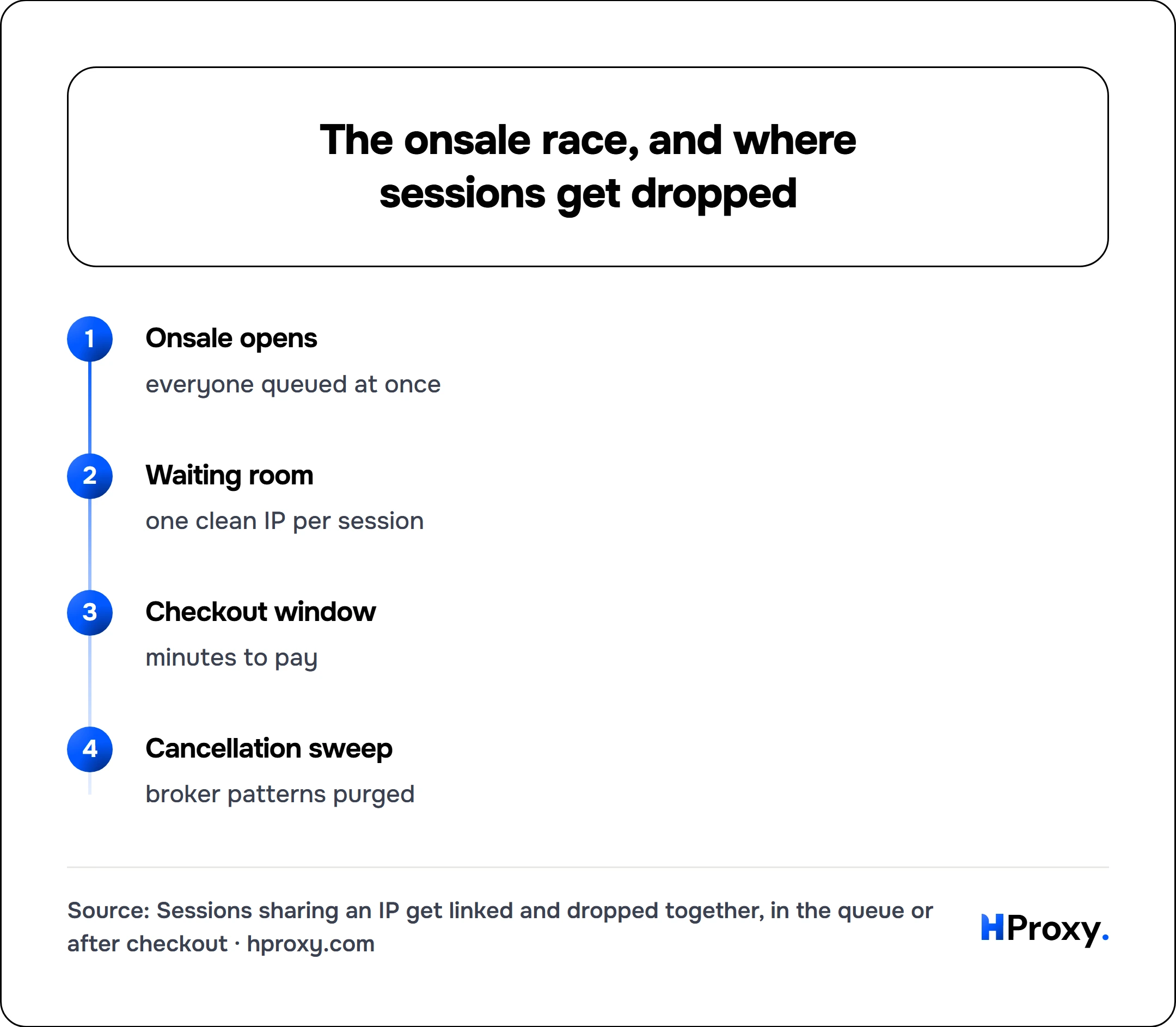
Onsale opens
everyone queued at once
Waiting room
one clean IP per session
Checkout window
minutes to pay
Cancellation sweep
broker patterns purged
Residential or ISP for ticketing
Two proxy types carry almost all serious ticketing traffic, and the more expensive one is not automatically the right call.
ISP proxies are static residential IPs: an address registered under a consumer ISP, so it reads as a genuine home connection, but hosted on datacenter-grade hardware so it stays fast and always on. For ticketing this is the common sweet spot. You get residential legitimacy and low latency in the same IP, and because it is static, the same trusted address can carry an account through weeks of ordinary use and then sit under it on onsale day.
Rotating residential proxies draw from a large pool of real home connections, handing out a different IP per session or per short sticky window. They are the most believable option to a strict platform and the easier way to spread a big run, because you are pulling many clean exits from a pool instead of managing a fixed list. The tradeoffs are the usual ones: real home lines are slower than ISP, and they bill per gigabyte. For a queue-and-checkout flow you want sticky sessions, so one attempt holds a single IP long enough to finish rather than swapping mid-purchase and logging itself out. We break the static-versus-rotating choice down in full in rotating vs static residential proxies.
Datacenter proxies are fast and cheap, and on a small, lightly defended onsale that speed can win a checkout. On Ticketmaster, AXS, and any major seller, they are detected and purged quickly, and orders placed through them are the first cancelled. Mobile proxies, carrier IPs shared by many real handsets, are the heavyweight tier for the most defended drops, and most setups never need them.
Which proxy fits which platform
Defenses shift as platforms update, so treat this as a starting point and test on the real site before an onsale, not as a fixed law.
| Platform | Proxy type that usually works | Notes |
|---|---|---|
| Ticketmaster (Smart Queue) | ISP or rotating residential | Heavy bot and device checks; datacenter dies fast |
| AXS | ISP or rotating residential | Queue plus account scrutiny; region-match the venue |
| Verified Fan or presale-code drops | Clean ISP or residential, but a code comes first | No proxy issues codes; registration decides entry |
| Regional sellers (Eventim, See Tickets, etc.) | ISP or residential | Match the country the event sells in |
| Small or general-admission onsales | Datacenter or ISP | Lighter defenses; use the cheapest tier that holds |
| High-broker, resale-flagged events | Rotating residential | Reputation and payment scrutiny at their highest |
The rule inside that table is the one that saves the most money: use the cheapest tier the event will tolerate, and step up only when sessions start getting purged or orders start getting cancelled.
How many IPs you actually need
Size your order from sessions, not from a number that sounds impressive.
The unit that matters is the session: one browser identity, on one account, trying to get through the queue and complete a purchase. On any platform that links and purges, the safe default is one clean IP per session, because two sessions sharing an address is precisely the pattern that gets both removed. So the math stays simple.
Sizing (one clean IP per queue session):
  proxies needed  =  number of parallel sessions you run
  20 sessions  ->  ~20 proxies + a few spare

Assign one clean, region-matched IP per session:
  session 1  ->  203.0.113.10    US East, aged account A
  session 2  ->  203.0.113.11    US East, aged account B
  session 3  ->  198.51.100.24   US East, aged account C
  session 4  ->  198.51.100.25   US East, aged account D
More sessions can raise your odds, but only if each one is a full, believable identity: its own clean IP, its own aged account, ideally its own payment detail. Twenty sessions sharing five IPs and one card make one obvious cluster waiting to be purged. For rotating residential the counting changes, because you are buying bandwidth through a pool rather than named IPs, so you size by gigabytes and let sticky sessions hold one exit per attempt. Either way, buy for the onsale you are actually running. Our pricing is pay-as-you-go with a balance that does not expire, so stocking up for a big Friday drop does not cost you anything on a quiet week.
Staying in the queue instead of getting purged
Getting an IP into the waiting room is easy; keeping the session alive through the purge is the harder part. Platforms quietly remove sessions that show the tells of automation, often with no visible error until the queue has moved on without you.
A few habits keep clean IPs clean:
- Do not overload one subnet. Even with one IP per session, running a hundred sessions from IPs that all sit in the same narrow range is a pattern. Spread across varied addresses and regions where the event allows it.
- Behave like a person in the room. Do not refresh the waiting page faster than an anxious human would, and do not fire requests on a perfect metronome. The request-hygiene checklist that keeps a scraper unblocked applies directly here; we cover it in depth in our guide to avoiding IP bans.
- Keep the account and IP consistent. An account that has logged in from one stable ISP address for weeks, then joins the queue from that same address, looks aged and normal. A brand-new account arriving from a brand-new IP moments before a hyped onsale is exactly the pairing platforms distrust.
- Test the IPs before onsale day. Proxies bought an hour before, never checked, are how people watch a queue fail in real time. Verify they are alive and exiting in the right region well ahead, so onsale minute is not when you discover a dead or mislocated IP.
The part a proxy cannot do
A proxy is one input, not the whole machine, and ticketing has more moving parts than most jobs we see. The IPs decide whether your sessions look like separate legitimate fans, and they do that well. They do nothing about the parts that increasingly decide big onsales.
The largest of those is access itself. High-demand tours now gate their real onsale behind Verified Fan registration or presale codes, given to a subset who signed up days earlier. No proxy conjures a code, and on a code-gated drop the registration, not the IP, is what gets you in. Payment is another: platforms link cards and accounts across sessions, so the same card firing through thirty sessions flags as fast as one reused IP would. And the queue itself is a lottery by design, which means even a clean, well-sized, well-paced setup can simply not get picked.
What good proxies do is give the sessions you run a fair, isolated shot instead of one flagged cluster. The dynamics are close cousins of sneaker copping, and the conclusion is the same: proxies solve IP reputation and isolation, and any provider claiming their IPs guarantee tickets is selling a story. Running many parallel sessions and accounts also breaks most sellers' terms of service, which is part of why orders get purged and cancelled; a proxy changes the network signal, not the rules. For most onsales that means ISP proxies for their blend of speed and residential trust, with rotating residential held for the hardest drops. Our pricing is pay-as-you-go with a balance that does not expire, so you can size up for the show you care about without bleeding money between them. Match the IP to the region, one clean IP per session, test before the doors open, and let the rest of your setup do its job.
Sources
- Queue-it, online ticket queues (waiting-room randomization, datacenter blocking, and the 500+ ticketing companies using it): queue-it.com
- TicketNews, the 2026 denial that queue placement is random: ticketnews.com