HTTP vs SOCKS5 proxy is the second choice every proxy buyer hits, right after picking an IP type, and the two protocols get explained badly almost everywhere. One gets called "the one for websites" and the other "the one for everything else," which is close enough to be misleading. The real split is how much of your traffic the proxy understands, and that single property decides its speed, its DNS behavior, and which jobs it is genuinely good at.
We run a proxy network, and every plan we sell speaks both protocols, so we have no reason to talk one up over the other. Here is the comparison: what an HTTP proxy is, what a SOCKS5 proxy is, how they differ line by line, and a short guide to picking the right one for the traffic in front of you.
What is the difference between an HTTP and a SOCKS5 proxy?
An HTTP proxy works at the application layer: it understands HTTP, so it can read, cache, and modify your web requests. A SOCKS5 proxy works lower down and forwards raw TCP or UDP without inspecting it, so it carries any protocol, not just web traffic. HTTP suits web work; SOCKS5 suits everything else.
That one difference, whether the proxy reads your traffic or just relays it, is the source of every trade-off below. Everything else is a consequence.
What an HTTP proxy actually is
An HTTP proxy speaks HTTP. When you send a request through it, the proxy reads the request line and headers, understands that you want a specific URL, and fetches it on your behalf. Because it operates at the application layer (the same layer your browser and your scraper live at), it can do things a dumb relay cannot: cache a response so the next request skips the origin, strip or inject headers, filter which URLs are allowed, and rewrite requests as they pass through. Corporate web filters, caching gateways, and most scraping middleware are HTTP proxies for exactly these reasons.
For encrypted sites it steps out of the way. When you request an HTTPS URL, your client sends the proxy a CONNECT host:443 command, defined in RFC 9110, the current HTTP semantics spec. The proxy then opens what that spec calls "a blind relay between two connections without changing the messages," and your TLS session flows through untouched. The spec is explicit that once the tunnel is up it "is not considered a party to the HTTP communication," so on HTTPS the proxy still learns the destination hostname (it has to, to open the tunnel) but cannot read the encrypted contents. On plain HTTP it sees everything, which is why an HTTP proxy is the layer where the transparent, anonymous, and elite anonymity grades on any proxy list actually mean something: a transparent proxy adds your real IP in an X-Forwarded-For header (the non-standard field that RFC 7239 later standardized as Forwarded), an elite one adds nothing. Those grades describe header behavior, and only a proxy that reads headers has any.
Typical HTTP proxy ports are 8080, 3128, and 80.
What a SOCKS5 proxy actually is
A SOCKS5 proxy does the opposite of understanding you: it relays raw connections and never looks inside. Your client tells it "connect me to this host and port," the proxy opens that connection, and from then on it shovels bytes in both directions without knowing or caring whether they are web pages, game packets, email, or a database wire protocol. It sits below the application layer, close to the transport layer, which is exactly why it is protocol-agnostic. Anything that runs over TCP can ride a SOCKS5 proxy, and through the UDP ASSOCIATE command in RFC 1928 it can relay UDP too (with the caveat that plenty of real servers, especially free ones, disable UDP or sit behind NAT that breaks it).
Two SOCKS5 details matter for this comparison. First, it can resolve DNS for you: a SOCKS5 request can carry the destination as an IP or as a hostname, and if you send the hostname the proxy does the lookup, keeping your DNS queries off your local network. Second, it adds no headers of any kind, so it structurally cannot leak your IP the way a transparent HTTP proxy does. It also adds no encryption, exactly like an HTTP proxy, so HTTPS is still what protects your data. The standard SOCKS5 port is 1080. For the full walkthrough of the handshake and its quirks, we wrote a dedicated guide to what a SOCKS5 proxy is.
HTTP vs SOCKS5, side by side
| HTTP proxy | SOCKS5 proxy | |
|---|---|---|
| Network layer | Application (L7) | Session (L5), below the app protocol |
| Understands your traffic | Yes, parses HTTP | No, relays raw bytes |
| Protocols it carries | HTTP, HTTPS via CONNECT | Any TCP, plus UDP via UDP ASSOCIATE |
| DNS resolution | Always at the proxy | At the proxy with socks5h, local with socks5 |
| Can cache, filter, rewrite | Yes | No |
| Adds identifying headers | Yes (transparent ones do) | No, none |
| Speed overhead | Slightly higher (parses headers) | Slightly lower (raw relay) |
| Encryption | None, bring your own TLS | None, bring your own TLS |
| Typical port | 8080, 3128, 80 | 1080 |
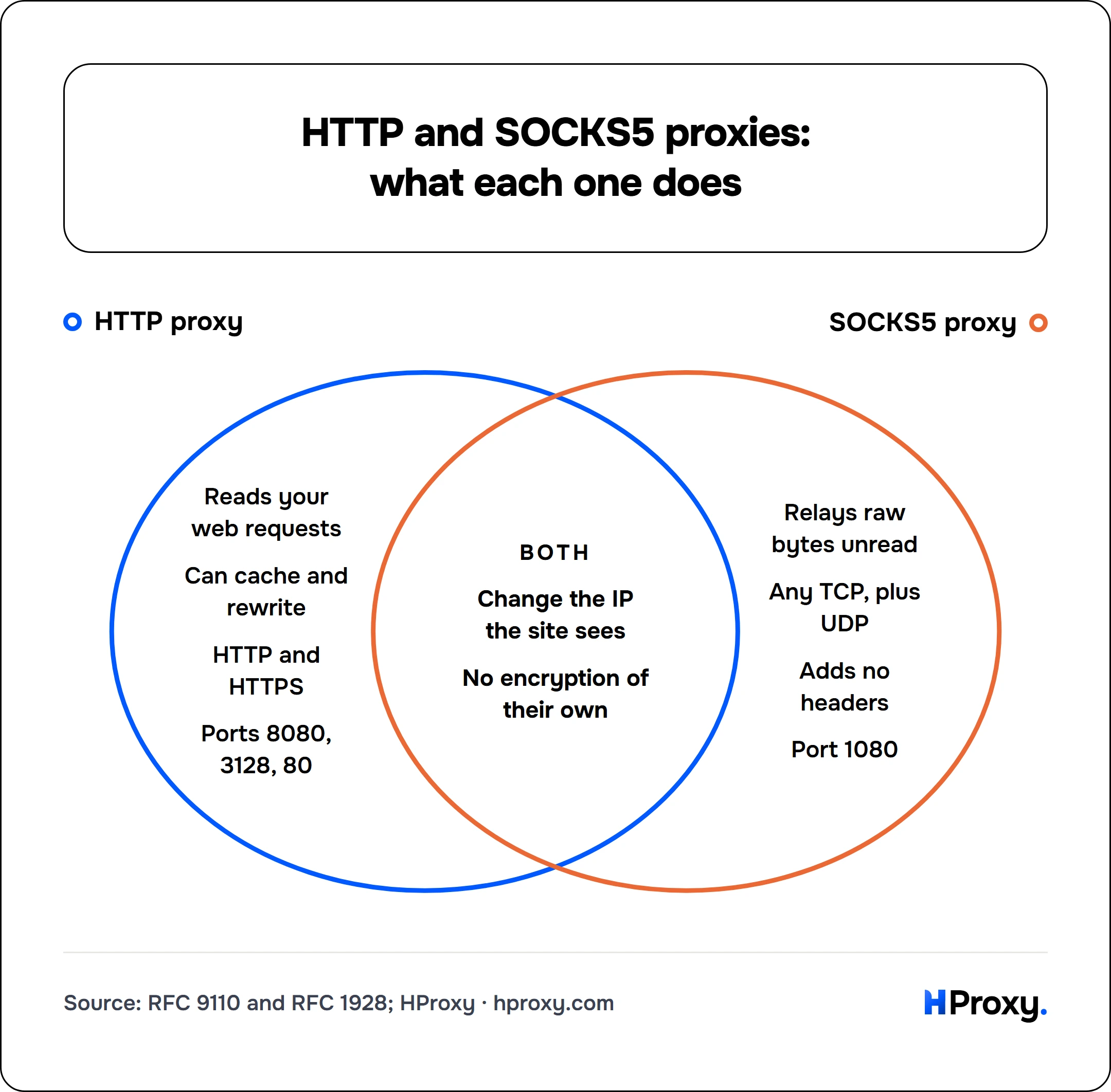
Only HTTP proxy
- Reads your web requests
- Can cache and rewrite
- HTTP and HTTPS
- Ports 8080, 3128, 80
Both
- Change the IP the site sees
- No encryption of their own
Only SOCKS5 proxy
- Relays raw bytes unread
- Any TCP, plus UDP
- Adds no headers
- Port 1080
Two rows carry most of the decision. "Understands your traffic" is the whole personality difference: it is why HTTP can cache and rewrite, and why SOCKS5 can carry protocols HTTP has never heard of. "DNS resolution" is the one that quietly burns people, so it gets its own section below.
Notice what is identical: neither protocol encrypts anything. "SOCKS5 is more secure" almost always means "it does not modify my traffic," which is a real property but not security. If your connection is HTTPS, TLS protects it through either proxy. If it is plain HTTP, both proxy types and their operators can read every byte.
How common is each protocol in the wild?
Neither protocol is rare, but the split is not even. When our own verification engine records the protocol of every proxy it can confirm across the public free pool, HTTP is the single most common at 36%, followed by SOCKS4 at 25%, HTTPS at 20%, and SOCKS5 at 19%. HTTP wins the individual count, but it does not hold a majority: SOCKS4 and SOCKS5 together come to about 44% of the graded pool, a much larger SOCKS presence than the "HTTP is the default, SOCKS is niche" folklore suggests.
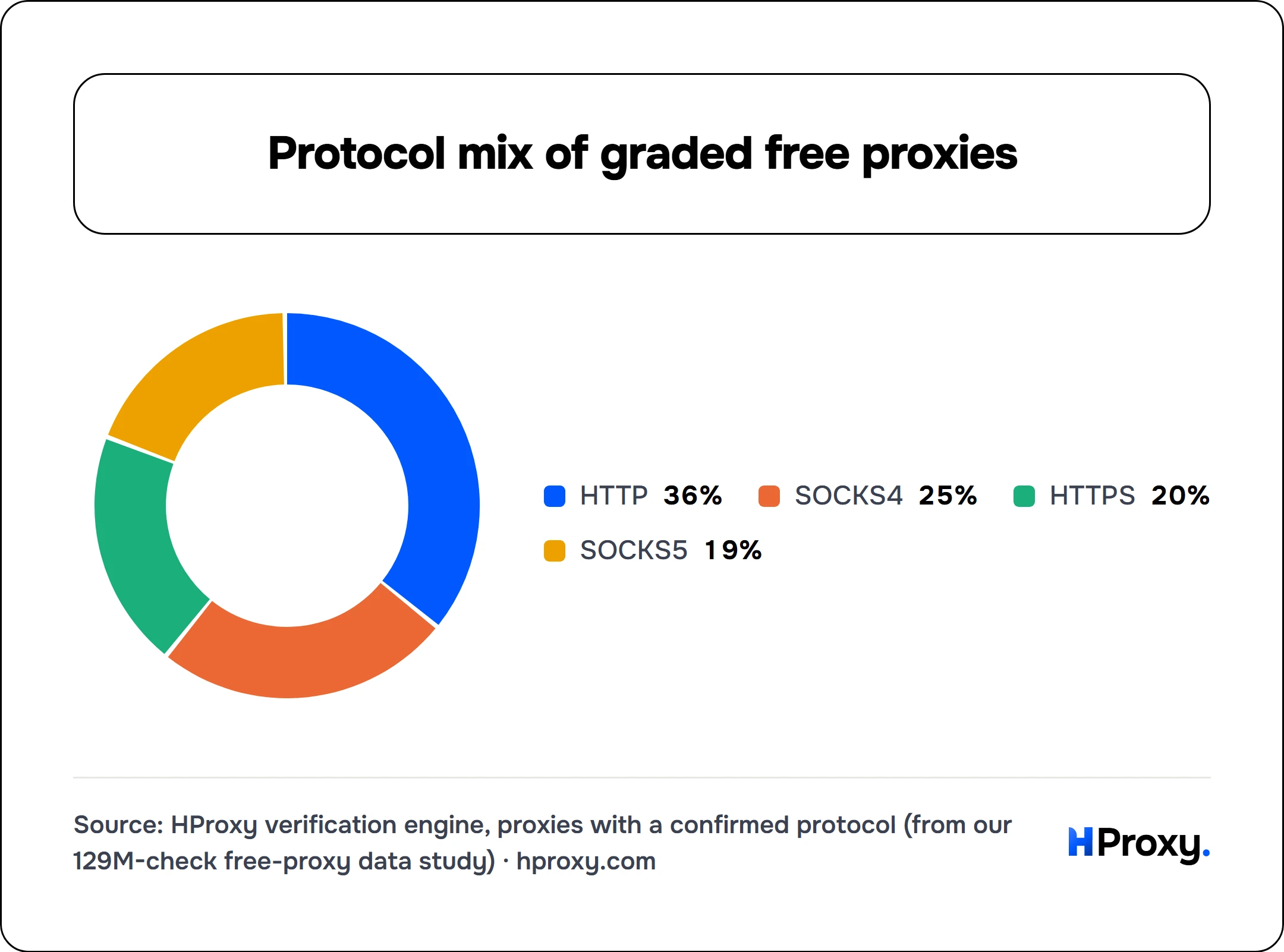
- HTTP36%
- SOCKS425%
- HTTPS20%
- SOCKS519%
The practical read: an HTTP-only setup has to skip every SOCKS4 and SOCKS5 entry, and that is roughly 44% of the confirmed pool. If your tooling can also speak SOCKS, you open up close to half the available proxies an HTTP-only tool cannot touch. This is the free public pool rather than a paid network, but it is the clearest large-sample picture of what is actually deployed. The full measurement sits in our free-proxy data study.
When to use an HTTP proxy
Reach for HTTP when the traffic is web traffic and you want the proxy to be part of the pipeline, not just a pipe:
- Web scraping that leans on header control. Injecting auth headers across a crawler fleet, rotating user agents at the proxy, or caching hot pages all need a proxy that reads HTTP. A raw relay cannot touch any of it.
- Browsers and everyday web tools. Browsers speak HTTP natively, so an HTTP proxy is the path of least resistance. Our Chrome proxy setup guide walks through it.
- Anywhere your tool only accepts HTTP proxies. Plenty of libraries and apps expose an HTTP-proxy field and nothing else. Protocol purity is worth zero if the software cannot use it.
When to use a SOCKS5 proxy
Reach for SOCKS5 when the traffic is not plain web browsing, or when you want the proxy to stay completely out of your data stream:
- Non-HTTP traffic. Mail clients, SSH hops, database connections, IRC, and custom binary protocols all run over TCP, and an HTTP proxy simply cannot carry most of them. SOCKS5 does not care what the protocol is.
- Torrents, game clients, and messaging apps. These commonly ship native SOCKS5 support and behave predictably through it, UDP caveats aside.
- DNS-leak-safe routing. With remote DNS resolution, both your destination traffic and your DNS lookups leave from the proxy, not from your machine. That is the privacy footgun HTTP proxies avoid by design and SOCKS5 avoids only when configured right, which is the next section.
The DNS detail: socks5 vs socks5h
This is the single most common misconfiguration we see, and it is invisible unless you look for it. A SOCKS5 proxy can resolve DNS for you, but only if you actually ask it to. In tools like curl the difference is one letter:
# socks5: YOUR machine resolves the hostname, then sends the proxy an IP.
# Your DNS query leaks to your local resolver.
curl -x socks5://198.51.100.14:1080 -s https://httpbin.org/ip

# socks5h: the PROXY resolves the hostname. No local DNS leak.
curl -x socks5h://198.51.100.14:1080 -s https://httpbin.org/ip
If you use a proxy for privacy and your DNS still goes out locally, the proxy is hiding far less than you think: your resolver, and anyone watching it, still sees every site you visit. HTTP proxies sidestep this entirely, because you hand them the full URL or a CONNECT target and they always resolve it. So on the DNS axis, an HTTP proxy is remote-by-default while a SOCKS5 proxy is remote-only-if-you-add-the-h. Our curl proxy guide covers the exact flags for both protocols.
The bottom line, and how to test it
There is no winner here, only a fit. Use an HTTP proxy when the traffic is web traffic and you want caching, filtering, or header control. Use a SOCKS5 proxy when the traffic is anything else, or when you want the proxy to relay your bytes without reading them and to resolve DNS on your side of the connection. Most real setups end up using both: HTTP for the browser-shaped work, SOCKS5 for everything that is not a web request.
The fastest way to feel the difference is to try each. Pull a live endpoint from the SOCKS5 section of our free list, grab an HTTP one from the main free proxy list, and run both through our proxy checker, which reports the protocol, the anonymity grade, and the real exit location for anything you paste in. Once the protocol choice is clear, it stays yours: every paid plan we sell answers on both HTTP and SOCKS5, so the only thing left to pick is the IP quality your target demands. That ladder starts at cheap IPv4 and IPv6 addresses for targets that do not check, and climbs to residential and mobile for the ones that do.
Sources and further reading
The protocol behavior described here comes from the specs themselves:
- RFC 9110: HTTP Semantics. Section 9.3.6 defines the
CONNECTmethod and describes the resulting tunnel as "a blind relay between two connections without changing the messages," which is why an HTTP proxy cannot read your HTTPS payload. - RFC 1928: SOCKS Protocol Version 5. Defines the raw-relay model, the address types that enable remote DNS resolution, and the
UDP ASSOCIATEcommand. - RFC 7239: Forwarded HTTP Extension. Standardizes the header behavior behind the transparent/anonymous/elite grades, and documents
X-Forwarded-Foras the non-standard predecessor. - HProxy, "We Ran 110 Million Checks on Free Proxies". The verification-engine source for the protocol mix (HTTP 36%, SOCKS4 25%, HTTPS 20%, SOCKS5 19%) across the confirmed free pool.